14.1. CANopen Overview
CANopen is a real-time, high-speed CAN-based protocol specified by CiA (CAN in Automation) for communicating among multiple nodes. CANopen networks are formed using twisted-pair cabling, where all network nodes can be directly wired together through D-sub connectors.
CANopen EDS (electronic datasheet) files are used to describe the communication parameters and object dictionary of CANopen nodes. Magna-Power Electronics provides this EDS file to customers which contains identifying information, supported communication objects, and parameter settings.
Magna-Power Electronics has implemented basic process data objects (PDOs) for use with our products. Customer PDO remapping is not supported. Layer setting services (LSS) is supported to change the node ID and baud rate of each node.
14.2. Physical Interface
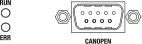
Fig. 14.1 Rear interface
14.2.1. D-sub 9 Port
The ALx Series has a single, male D-sub 9 port on the rear of the unit for CANopen communications, shown in Rear interface labeled CANOPEN. The pinout for the D-sub 9 port is as follows:
Pin 2: CAN_L
Pin 3: CAN GND (isolated)
Pin 5: Shield GND
Pin 7: CAN_H
14.2.2. LED Codes
In the rear of the ALx Series is a communications interface with two exposed bi-color LEDs. The LED labeled RUN indicates status of the CANopen device and the one labeled ERR indicates CANopen communication errors, as shown in Rear interface. Status is indicated using colors and blink patterns, as shown in the tables below.
State |
Description |
|---|---|
Off |
No power or initializing |
Green |
Online, operational state |
Green, flashing |
Online, pre-operational state |
Green, 1 flash |
Online, stopped state |
Green, rapid flickering |
Baud rate detection or LSS in progress |
Red |
Fatal event |
State |
Description |
|---|---|
Off |
No power or no error |
Red, 1 flash |
Bus warning limit reached |
Red, 2 flashes |
Error control event |
Red, rapid flickering |
LSS in progress |
Red |
Bus off (fatal event) |
14.3. Data Objects
14.3.1. Process Data Objects (PDOs)
PDOs are real-time data frequently sent to and from connected Magna-Power Electronics nodes. When describing PDO traffic, it is referenced with respect to the CANopen slave node. For example, Transmit PDOs (TPDO) are transmitted from the slave and are read-only, while Receive PDOs (RPDO) transmits variables to the slave and have write access. Measurement readings would be mapped in the TPDO Mapping, whereas set points would be in the RPDO Mapping.
14.3.2. Service Data Objects (SDOs)
SDOs are messages sent on request and have no timing expectations. SDOs are intended for non-real-time communications, as they must wait for the network to respond. They are typically used for reporting the node status, changing operating modes, etc. SDOs variables should not be used to update values already part of a PDO, as they are updated regularly, and the values would be overwritten by the PDO.
14.4. CANopen State Machine
The master controls slaves by following the CANopen state machine. Slaves can transition between four states: Init, Pre-Operational, Operational, and Stopped. In each state, configuration checks are made and different types of communications are allowed. The transition between states are diagrammed in CANopen state machine. Allowed communications in each state is described in Allowed protocols for each state. Nodes enter Init when first switched-on and reach Operational under normal conditions.
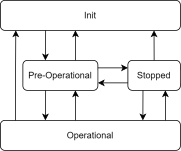
Fig. 14.2 CANopen state machine
State |
RSDO/TSDO |
TPDO |
RPDO |
|---|---|---|---|
Init |
|||
Pre-Operational |
✓ |
||
Operational |
✓ |
✓ |
✓ |
Stopped |
14.5. CANopen Default Node Settings
The default settings for Magna-Power Electronics CANopen nodes are as follows:
Node ID: 0x70
Data rate: 10 kbps
These settings can be changed using Layer Setting Services (LSS). The exact procedure for changing these settings is device-specific and can be found in your PLC’s user manual. The details needed to reconfigure Magna-Power Electronics CANopen nodes are found in Node details for LSS. Note that the serial number is a unique identifier for each node and can be found printed on on the product label or through the about menu. The serial used for LSS is the part of the serial number that is listed after the - symbol in the product’s serial number.
Property |
Value |
|---|---|
Vendor ID |
0x0000001B |
Product Code |
0x0000000D |
Revision Number |
0x00010002 |
Serial Number |
product serial (32-bit) |
14.6. Development using Python
Communication with Magna-Power Electronics CANopen nodes can be done using the canopen Python library. The library allows for communication using CANopen and can be used to read and write data to CANopen nodes. The library is available for download on the Python Package Index (PyPI) using the link: canopen
A compatible CAN interface is needed. A full list of compatible interfaces is listed in the canopen library’s documentation, found here. Internally, Magna-Power Electronics uses the Seeed Studio USB to CAN Analyzer (114991193) for its CANopen development and testing.
14.6.1. Device Setup
Ensure that the canopen library and any necessary drivers are installed on your system. In order to correctly access the node’s object dictionary, Magna-Power Electronics supplies an EDS file with your CANopen product.
Magna-Power Electronics EDS File
The following code snippet shows how to create a CANopen network and connect to a node with the default node ID of 0x70 and data rate of 10 kbps. Ensure that the bus type and channel are set to the correct values for your interface. This code snippet also assumes that the EDS file is in the same directory as the script.
import canopen

# Set the interface port and bitrate
INTERFACE_PORT = 'COM7'
BITRATE = 10000

# Create a CANopen network and connect to the node
network = canopen.Network()
network.connect(bustype='seeedstudio', channel=INTERFACE_PORT, bitrate=BITRATE)
mpeNode = canopen.RemoteNode(0x70, 'mpe_canopen.eds')
network.add_node(mpeNode)

# Set the SDO response timeout to 2 seconds
mpeNode.sdo.RESPONSE_TIMEOUT = 2

# Set the state of the node to pre-operational
 mpeNode.nmt.state = 'PRE-OPERATIONAL'

# Add code here to read/write data to the node

network.disconnect()
14.6.2. SDO Communication
The available SDO variables are listed in the Manufacturer Specific Service Data Objects section. The following code snippet shows how to read and write to an SDO variable.
# Read from an SDO variable
current = mpeNode.sdo['MeasCurrQ'].raw

# Write to an SDO variable
mpeNode.sdo['SetpointCurr'].raw = 1.5
For SDO variables with multiple subindices, the subindex can be accessed using the following syntax:
status0 = mpeNode.sdo["StatusRegQ"][1].raw
status1 = mpeNode.sdo["StatusRegQ"][2].raw
14.6.3. PDO Communication
The available PDO variables are listed in the Manufacturer Specific Process Data Objects section. Before enabling PDO communication, the PDO configuration must be read from the node. The following code snippet shows how to read the PDO configuration from the connected node.
# Read PDO configurations from node
mpeNode.tpdo.read()
mpeNode.rpdo.read()
Note that TPDO data is the data transmitted by the Magna-Power Electronics node, while RPDO is the data received by the node.
There are two main ways to access PDO data: using the sync method or by using up an event timer. The sync method` is used to sync the PDO data with the node when a sync command is sent by the master, while the event timer` is used to specify the interval at which the node should transmit and receive its PDO data. The following code snippet shows how to setup the sync method to read PDO data and print to the console. Note that sync commands can be sent manually, or at fixed intervals as shown in the code.
# Set TPDO 1's transmit mode to sync
mpeNode.sdo['TPDO communication parameter 1']['Transmission type'].raw = 1

# Send a single sync command to the node
network.sync.transmit()

# Set up sync timer for automatic sync transmission
network.sync.start(0.25)  # Sync every 0.25 seconds

# Change state to operational (NMT start)
mpeNode.nmt.state = 'OPERATIONAL'
The following code snippet uses an event timer to automatically transmit the data without the need for a sync command:
# Set TPDO 1's transmit mode to be internal-event triggered
mpeNode.sdo['TPDO communication parameter 1']['Transmission type'].raw = 255

# Set event timer to 250 ms
mpeNode.sdo['TPDO communication parameter 1']['Event timer'].raw = 250

# Change state to operational (NMT start)
mpeNode.nmt.state = 'OPERATIONAL'
14.6.4. Layer Setting Services (LSS)
Layer setting services (LSS) can be used to change the node ID and data rate of a target CANopen node to meet the demands of your network. There are two possible states for LSS: configuration and waiting. In the configuration state, the LSS master can change the node ID and data rate of the node. In the waiting state, the node operates normally.
There are two methods to bring a node into the configuration state. The first method is selective and requires knowledge of the connected node’s properties. These include the vendor ID, product code, revision number, and serial number. The default values for these properties can be found in Node details for LSS. To selectively request the node to enter the configuration state, the following code snippet can be used:
network.lss.send_switch_state_selective(vendorId=0x1B, productCode=0xD, revisionNumber=0x10002, serialNumber=SERIAL_NUMBER)
If the node’s properties are not known, users can globally request all connected nodes to enter the configuration state. The following code snippet can be used to globally request all connected nodes to enter the configuration state:
network.lss.send_switch_state_global(network.lss.CONFIGURATION_STATE)
Once a node is in the LSS configuration state, the node ID and data rate can be changed. The following code snippet shows how to change these settings:
# Change the node ID to 0x71
network.lss.configure_node_id(0x71)

# Change the data rate to 500 kbps
network.lss.configure_bit_timing(2)
Note that when setting the node ID, only one node should be connected to the CANopen network to prevent address conflicts. This node ID can be set to any value between 0x01 and 0x7F. Data rates are set based on bit-timing values, as shown in Bit timing values for different data rates.
idx |
Data rate |
|---|---|
8 |
10 kbps |
7 |
20 kbps |
6 |
50 kbps |
5 |
100 kbps |
4 |
125 kbps |
3 |
250 kbps |
2 |
500 kbps |
1 |
800 kbps |
0 |
1 Mbps |
Finally, once the node is configured, the settings can be saved and the nodes can be brought back into the operational state using the following code snippet:
network.lss.store_configuration()
network.lss.send_switch_state_global(network.lss.WAITING_STATE)
14.7. Standard Object Dictionary
The physical interface to a CANopen network is performed with an industrial communication module installed internal to the ALx Series. The module complies with version 4.2.0 of the CiA 301 specification. This specification calls for services and standard data object implementations outlined in the reference material below. The data objects reside in allocated address space shown in Data object dictionary
Network Interface Appendix Anybus CompactCom CANopen Doc.Id. SCM-1202-108
Index |
Object |
|---|---|
0x0000 |
Reserved |
0x001-0x025F |
Data types |
0x0260-0x0FFF |
Reserved |
0x1000-0x1FFF |
Communication profile area |
0x2000-0x5FFF |
Manufacturer specific profile area |
0x6000-0x9FFF |
Standardized device profile area |
0xA000-0xBFFF |
Standardized interface profile area |
0xC000-0xFFFF |
Reserved |
14.8. Manufacturer Specific Instances Listing
CANopen Command |
Write Index |
Read Index |
Description |
|---|---|---|---|
Operation Commands |
|||
N/A |
0x200B |
Returns the value of the Questionable Status register |
|
N/A |
0x200C |
Returns the value of the Operation Status register |
|
N/A |
0x200D |
Status Register |
|
0x2011 |
0x2012 |
Enables or disables the DC input based on parameter setting |
|
Measurement Commands |
|||
N/A |
0x2101 |
Measures and returns the average current at the sense location |
|
N/A |
0x2102 |
Measures and returns the average voltage at the sense location |
|
N/A |
0x2103 |
Measures and returns the instantaneous DC power at sense location |
|
N/A |
0x2104 |
Measures and returns the instantaneous resistance at sense location |
|
Setpoint Commands |
|||
0x2201 |
0x2202 |
Sets the current set-point |
|
0x2203 |
0x2204 |
Sets the voltage set-point |
|
0x2205 |
0x2206 |
Sets the power set-point |
|
0x2207 |
0x2208 |
Sets the resistance set-point |
|
Trip Commands |
|||
0x2301 |
0x2302 |
Sets the over current trip (OCT) set-point |
|
0x2303 |
0x2304 |
Sets the over voltage trip (OVT) set-point |
|
0x2305 |
0x2306 |
Sets the over power trip (OPT) set-point |
|
0x2307 |
0x2308 |
Sets the under voltage trip (UVT) set-point |
|
Slew Commands |
|||
0x2401 |
0x2402 |
Sets the rising slew rate for current when in current regulation state |
|
0x2403 |
0x2404 |
Sets the rising slew rate for voltage when in voltage regulation state |
|
0x2405 |
0x2406 |
Sets the rising slew rate for power when in power regulation state |
|
0x2407 |
0x2408 |
Sets the rising slew rate for resistance when in resistance regulation state |
|
0x2409 |
0x240A |
Sets the falling slew rate for current when in current regulation state |
|
0x240B |
0x240C |
Sets the falling slew rate for voltage when in voltage regulation state |
|
0x240D |
0x240E |
Sets the falling slew rate for power when in power regulation |
|
0x240F |
0x2410 |
Sets the falling slew rate for resistance when in resistance regulation state |
|
Control Commands |
|||
0x2503 |
0x2504 |
Sets the control mode |
|
Function Generator Commands |
|||
0x2601 |
0x2602 |
Sets the desired function for the integrated function generator |
|
0x2603 |
0x2604 |
Sets the amplitude for the sinusoid function |
|
0x2605 |
0x2606 |
Sets the DC offset from zero for the sinusoid function’s midline |
|
0x2607 |
0x2608 |
Sets the period for the sinusoid function |
|
0x2609 |
0x260A |
Sets the low level amplitude for the square function |
|
0x260B |
0x260C |
Sets the high level amplitude for the square function |
|
0x260D |
0x260E |
Sets the period that the square function remains at the low level amplitude |
|
0x260F |
0x2610 |
Sets the period that the square function remains at the high level amplitude |
|
0x2611 |
0x2612 |
Sets the low level amplitude for the step function |
|
0x2613 |
0x2614 |
Sets the high level amplitude for the step function |
|
0x2615 |
0x2616 |
Sets the low level amplitude for the ramp function |
|
0x2617 |
0x2618 |
Sets the high level amplitude for the ramp function |
|
0x2619 |
0x261A |
Sets the period for the ramp function to transition from low to high level amplitude |
|
0x261B |
0x261C |
Sets the period for the ramp function to transition from high to low level amplitude |
|
Configuration Commands |
|||
0x2701 |
N/A |
Restores the factory EEPROM data |
|
0x2703 |
0x2702 |
Locks and unlocks the product from configuration and set-point changes |
|
0x2706 |
0x2707 |
Configures the sense location and automated compensation values |
|
0x2708 |
0x2709 |
Changes the communication protocol |
|
0x270A |
0x270B |
Sets the setpoint source |
|
0x270C |
0x270D |
Changes the MagnaLINK mode to allow for standalone or master-slave configuration |
|
0x270E |
N/A |
Reinitialize all connected slaves |
|
0x270F |
0x2710 |
Sets the cooling mode |
14.9. Manufacturer Specific Process Data Objects
14.9.1. Operation Commands
14.9.2. StatusRegQ
This command queries the Status Register. This read-only register holds the live (unlatched) operation status of the MagnaLOAD electronic load. Issuing a query does not clear the register. The register location and definitions are subject to change after any firmware release to accommodate new features. The Questionable Register is a subset of the status register and does not change between firmware updates. The present bit assignments are shown in the table below.
- Access
RO
- Data Format
32-bit Integer
Status Register 0
Bit |
Name |
Description |
|---|---|---|
0 |
standby |
output is in standby |
1 |
live |
output is active |
2 |
solenoidStatus |
aux power solenoid is open |
3 |
nonhalt2 |
available |
4 |
overCurrTrip |
over current trip |
5 |
overVoltTrip |
over voltage trip |
6 |
overPwrTrip |
over power trip |
7 |
remoteSenseLoss |
remote sense voltage outside of acceptable bounds |
8 |
underVoltTrip |
under voltage trip |
9 |
shutdown |
target is creating a shutdown condition |
10 |
linPwrLim |
power across linear modules exceed ratings |
11 |
resPwrLim |
power across resistors exceed ratings |
12 |
bootFailure |
one or multiple target did not boot up |
13 |
bootState |
one or more targets are waiting to boot |
14 |
phaseCurr |
rated phase current exceeded |
15 |
comm |
communications are corrupted |
16 |
overCurrProtect |
terminal current exceeded product rating |
17 |
overVoltProtect |
terminal voltage exceeded product rating |
18 |
tempRLin |
linear module exceeded temperature |
19 |
blownFuse |
fuse is blown on the auxiliary power supply |
20 |
interlock |
interlock open |
21 |
haltUserClear |
available |
22 |
maintenance |
maintenance |
23 |
tempDMod |
diode modules exceeded temperature |
24 |
incompatibleSysConfig |
incompatible system configuration |
25 |
stackOverflow |
exceeded firmware stack |
26 |
lineFault |
line fault analog/digital inputs |
27 |
tempRMod |
resistor module exceeded temperature |
28 |
belowRatedMinVolt |
below minimum voltage rating(28) |
29 |
outOfRegulation |
out of regulation, unexpected currents measured |
30 |
targetUpgrade |
mainctrl upgrading other targets |
31 |
haltSelfClear |
available |
Status Register 1
Bit |
Name |
Description |
|---|---|---|
0 |
phaseLoss |
one or more phase missing |
1 |
blownFuseInput |
input fuse blown on fuse/emi filter |
2 |
fanLockedRotor |
one or more fan’s rotor has locked |
3 |
notUsed29 |
available |
4 |
tempPwrMod |
power processing module temperature fault |
5 |
tempOutputMod |
output filter module temperature fault |
6 |
tempOutputCap |
output capacitors temperature fault |
7 |
tempTransformer |
transformer exceeded temperature fault |
8 |
notUsed26 |
available |
9 |
notUsed27 |
available |
10 |
notUsed28 |
available |
11 |
notUsed1 |
available |
12 |
notUsed2 |
available |
13 |
notUsed3 |
available |
14 |
notUsed4 |
available |
15 |
notUsed5 |
available |
16 |
invalidSysRating |
invalid system rating |
17 |
fwVersConflict |
firmware version conflict |
18 |
notUsed8 |
available |
19 |
notUsed9 |
available |
20 |
notUsed10 |
available |
21 |
notUsed11 |
available |
22 |
notUsed12 |
available |
23 |
notUsed13 |
available |
24 |
notUsed14 |
available |
25 |
notUsed15 |
available |
26 |
notUsed16 |
available |
27 |
notUsed17 |
available |
28 |
notUsed18 |
available |
29 |
notUsed19 |
available |
30 |
notUsed20 |
available |
31 |
notUsed21 |
available |
14.9.3. Measurement Commands
14.9.4. MeasCurrQ
This query commands the MagnaLOAD electronic load to measure and return the average current through the DC terminals.
- Access
RO
- Data Format
32-bit Floating Point Number
14.9.5. MeasVoltQ
This query commands commands the MagnaLOAD electronic load to measure and return the average voltage at the DC terminals. If the remote sense function is used and engaged, this command returns the voltage measured at the sense terminals.
- Access
RO
- Data Format
32-bit Floating Point Number
14.9.6. Setpoint Commands
14.9.7. SetpointCurr
This command programs the current set-point that the MagnaLOAD electronic load will regulate to when operating in constant current mode.
- Access
RW
- Data Format
32-bit Floating Point Number
14.9.8. SetpointVolt
This command programs the voltage set-point, in volts, which the MagnaLOAD electronic load will regulate to when operating in constant voltage mode.
- Access
RW
- Data Format
32-bit Floating Point Number
14.10. Manufacturer Specific Service Data Objects
14.10.1. Operation Commands
14.10.1.1. StatusQuesQ
This command queries and returns the values of the Questionable Register. This read-only register holds the live (unlatched) questionable statuses of the MagnaLOAD electronic load. Issuing this query does not clear the register. The bit configuration of the Questionable Register is shown in the table below.
- Index
0x200B
- Access
RO
- Data Format
32-bit Integer
Questionable Register
Bit |
Weight |
Abbreviation |
Description |
|---|---|---|---|
0 |
1 |
OVP |
over voltage protection, hard fault |
1 |
2 |
OCT |
over current trip, soft fault |
2 |
4 |
OVT |
over voltage trip, soft fault |
3 |
8 |
OPT |
over power trip, soft fault |
4 |
16 |
OCP |
over current protection, hard fault |
5 |
32 |
OTP |
over temperature protection, hard fault |
6 |
64 |
RSL |
remote sense loss, soft fault |
7 |
128 |
SFLT |
soft fault, the ord value of all soft faults |
8 |
256 |
HFLT |
hard fault, the ord value of all hard faults |
9 |
512 |
ILOC |
interlock open, soft fault |
10 |
1024 |
IPL |
input power loss fault, hard fault |
11 |
2048 |
ADIF |
analog or digital input fault, hard fault |
14.10.1.2. StatusOperQ
This command queries and returns the values of the Operation Register. This read-only register holds the live (unlatched) operation statuses of the MagnaLOAD electronic load. Issuing this query does not clear the register. The bit configuration of the Operation Register is shown in the table below.
- Index
0x200C
- Access
RO
- Data Format
32-bit Integer
Operation Register
Bit |
Weight |
Abbreviation |
Description |
|---|---|---|---|
0 |
1 |
STBY |
standby |
1 |
2 |
EN |
enabled |
2 |
4 |
RSEN |
remote sense |
3 |
8 |
LOCK |
front panel locked |
4 |
16 |
CC |
constant current regulation, regulation status |
5 |
32 |
CV |
constant voltage regulation, regulation status |
6 |
64 |
CR |
constant resistance regulation, regulation status |
7 |
128 |
CP |
constant power regulation, regulation status |
14.10.1.3. StatusRegQ
This command queries the Status Register. This read-only register holds the live (unlatched) operation status of the MagnaLOAD electronic load. Issuing a query does not clear the register. The register location and definitions are subject to change after any firmware release to accommodate new features. The Questionable Register is a subset of the status register and does not change between firmware updates. The present bit assignments are shown in the table below.
- Index
0x200D
- Access
RO
- Data Format
32-bit Integer
Status Register 0
Bit |
Name |
Description |
|---|---|---|
0 |
standby |
output is in standby |
1 |
live |
output is active |
2 |
solenoidStatus |
aux power solenoid is open |
3 |
nonhalt2 |
available |
4 |
overCurrTrip |
over current trip |
5 |
overVoltTrip |
over voltage trip |
6 |
overPwrTrip |
over power trip |
7 |
remoteSenseLoss |
remote sense voltage outside of acceptable bounds |
8 |
underVoltTrip |
under voltage trip |
9 |
shutdown |
target is creating a shutdown condition |
10 |
linPwrLim |
power across linear modules exceed ratings |
11 |
resPwrLim |
power across resistors exceed ratings |
12 |
bootFailure |
one or multiple target did not boot up |
13 |
bootState |
one or more targets are waiting to boot |
14 |
phaseCurr |
rated phase current exceeded |
15 |
comm |
communications are corrupted |
16 |
overCurrProtect |
terminal current exceeded product rating |
17 |
overVoltProtect |
terminal voltage exceeded product rating |
18 |
tempRLin |
linear module exceeded temperature |
19 |
blownFuse |
fuse is blown on the auxiliary power supply |
20 |
interlock |
interlock open |
21 |
haltUserClear |
available |
22 |
maintenance |
maintenance |
23 |
tempDMod |
diode modules exceeded temperature |
24 |
incompatibleSysConfig |
incompatible system configuration |
25 |
stackOverflow |
exceeded firmware stack |
26 |
lineFault |
line fault analog/digital inputs |
27 |
tempRMod |
resistor module exceeded temperature |
28 |
belowRatedMinVolt |
below minimum voltage rating(28) |
29 |
outOfRegulation |
out of regulation, unexpected currents measured |
30 |
targetUpgrade |
mainctrl upgrading other targets |
31 |
haltSelfClear |
available |
Status Register 1
Bit |
Name |
Description |
|---|---|---|
0 |
phaseLoss |
one or more phase missing |
1 |
blownFuseInput |
input fuse blown on fuse/emi filter |
2 |
fanLockedRotor |
one or more fan’s rotor has locked |
3 |
notUsed29 |
available |
4 |
tempPwrMod |
power processing module temperature fault |
5 |
tempOutputMod |
output filter module temperature fault |
6 |
tempOutputCap |
output capacitors temperature fault |
7 |
tempTransformer |
transformer exceeded temperature fault |
8 |
notUsed26 |
available |
9 |
notUsed27 |
available |
10 |
notUsed28 |
available |
11 |
notUsed1 |
available |
12 |
notUsed2 |
available |
13 |
notUsed3 |
available |
14 |
notUsed4 |
available |
15 |
notUsed5 |
available |
16 |
invalidSysRating |
invalid system rating |
17 |
fwVersConflict |
firmware version conflict |
18 |
notUsed8 |
available |
19 |
notUsed9 |
available |
20 |
notUsed10 |
available |
21 |
notUsed11 |
available |
22 |
notUsed12 |
available |
23 |
notUsed13 |
available |
24 |
notUsed14 |
available |
25 |
notUsed15 |
available |
26 |
notUsed16 |
available |
27 |
notUsed17 |
available |
28 |
notUsed18 |
available |
29 |
notUsed19 |
available |
30 |
notUsed20 |
available |
31 |
notUsed21 |
available |
14.10.1.4. Input
This command enables or disables the MagnaLOAD electronic load input. The state of a disabled input is a high impedance condition.
- Index
0x2011
- Access
RW
- Data Format
Boolean
- Index
0x2012
- Access
RO
- Data Format
Boolean
14.10.2. Measurement Commands
14.10.2.1. MeasCurrQ
This query commands the MagnaLOAD electronic load to measure and return the average current through the DC terminals.
- Index
0x2101
- Access
RO
- Data Format
32-bit Floating Point Number
14.10.2.2. MeasVoltQ
This query commands commands the MagnaLOAD electronic load to measure and return the average voltage at the DC terminals. If the remote sense function is used and engaged, this command returns the voltage measured at the sense terminals.
- Index
0x2102
- Access
RO
- Data Format
32-bit Floating Point Number
14.10.2.3. MeasPwrQ
This query commands commands the MagnaLOAD electronic load to measure and return the average power at the DC terminals.
- Index
0x2103
- Access
RO
- Data Format
32-bit Floating Point Number
14.10.2.4. MeasResQ
This query commands commands the MagnaLOAD electronic load to measure and return the average power at the DC terminals.
- Index
0x2104
- Access
RO
- Data Format
32-bit Floating Point Number
14.10.3. Setpoint Commands
14.10.3.1. SetpointCurr
This command programs the current set-point that the MagnaLOAD electronic load will regulate to when operating in constant current mode.
- Index
0x2201
- Access
RW
- Data Format
32-bit Floating Point Number
- Index
0x2202
- Access
RO
- Data Format
32-bit Floating Point Number
14.10.3.2. SetpointVolt
This command programs the voltage set-point, in volts, which the MagnaLOAD electronic load will regulate to when operating in constant voltage mode.
- Index
0x2203
- Access
RW
- Data Format
32-bit Floating Point Number
- Index
0x2204
- Access
RO
- Data Format
32-bit Floating Point Number
14.10.3.3. SetpointPwr
This command programs the power set-point, in watts, which the MagnaLOAD electronic load will regulate to when operating in constant power mode.
- Index
0x2205
- Access
RW
- Data Format
32-bit Floating Point Number
- Index
0x2206
- Access
RO
- Data Format
32-bit Floating Point Number
14.10.3.4. SetpointRes
This command programs the resistance set-point, in ohms, which the MagnaLOAD electronic load will regulate to when operating in constant resistance mode.
- Index
0x2207
- Access
RW
- Data Format
32-bit Floating Point Number
- Index
0x2208
- Access
RO
- Data Format
32-bit Floating Point Number
14.10.4. Trip Commands
14.10.4.1. OverTripCurr
This command programs the over current trip (OCT) set-point. If the input current exceeds the over current trip set-point for multiple samples, the input is disconnected and an OCT fault is indicated.
- Index
0x2301
- Access
RW
- Data Format
32-bit Floating Point Number
- Index
0x2302
- Access
RO
- Data Format
32-bit Floating Point Number
14.10.4.2. OverTripVolt
This command programs the over voltage trip (OVT) set-point. If the input voltage exceeds the over voltage trip set-point for multiple samples, the input is disconnected and an OVT fault is indicated.
- Index
0x2303
- Access
RW
- Data Format
32-bit Floating Point Number
- Index
0x2304
- Access
RO
- Data Format
32-bit Floating Point Number
14.10.4.3. OverTripPwr
This command programs the over power trip (OPT) set-point. If the input power exceeds the over power trip set-point for multiple sample, the input is disconnected and an OPT fault is indicated.
- Index
0x2305
- Access
RW
- Data Format
32-bit Floating Point Number
- Index
0x2306
- Access
RO
- Data Format
32-bit Floating Point Number
14.10.4.4. UnderTripVolt
This command programs the under voltage trip (UVT) set-point. If the input voltage falls below the under voltage trip set-point for multiple samples, the input is disconnected and an UVT fault is indicated.
- Index
0x2307
- Access
RW
- Data Format
32-bit Floating Point Number
- Index
0x2308
- Access
RO
- Data Format
32-bit Floating Point Number
14.10.5. Slew Commands
14.10.5.1. RiseRampCurr
This command sets the current slew rate for increasing current transitions while in constant current regulation. MAXimum sets the slew to the fastest possible rate. MINimum sets the slew to the slowest rate. Slew rates less than the minimum value are set to MINimum. Slew rate settings less than the minimum value are set to MINimum. Slew rate settings greater than the maximum value are set to MAXimum.
- Index
0x2401
- Access
RW
- Data Format
32-bit Floating Point Number
- Index
0x2402
- Access
RO
- Data Format
32-bit Floating Point Number
14.10.5.2. RiseRampVolt
This command sets the voltage slew rate for increasing voltage transitions while in constant voltage regulation. The units for voltage slew rate are volts per millisecond. MAXimum sets the slew to the fastest possible rate. MINimum sets the slew to the slowest rate. Slew rates less than the minimum value are set to MINimum. Slew rate settings less than the minimum value are set to MINimum. Slew rate settings greater than the maximum value are set to MAXimum.
- Index
0x2403
- Access
RW
- Data Format
32-bit Floating Point Number
- Index
0x2404
- Access
RO
- Data Format
32-bit Floating Point Number
14.10.5.3. RiseRampPwr
This command sets the power slew rate for increasing power transitions while in constant power regulation. The units for power slew rate are watts per millisecond. MAXimum sets the slew to the fastest possible rate. MINimum sets the slew to the slowest rate. Slew rates less than the minimum value are set to MINimum. Slew rate settings less than the minimum value are set to MINimum. Slew rate settings greater than the maximum value are set to MAXimum.
- Index
0x2405
- Access
RW
- Data Format
32-bit Floating Point Number
- Index
0x2406
- Access
RO
- Data Format
32-bit Floating Point Number
14.10.5.4. RiseRampRes
This command sets the resistance slew rate for increasing resistance transitions while in constant resistance regulation. The units for resistance slew rate are ohms per millisecond. MAXimum sets the slew to the fastest possible rate. MINimum sets the slew to the slowest rate. Slew rates less than the minimum value are set to MINimum. Slew rate settings less than the minimum value are set to MINimum. Slew rate settings greater than the maximum value are set to MAXimum.
- Index
0x2407
- Access
RW
- Data Format
32-bit Floating Point Number
- Index
0x2408
- Access
RO
- Data Format
32-bit Floating Point Number
14.10.5.5. FallRampCurr
This command sets the current slew rate for decreasing current transitions while in constant current regulation. MAXimum sets the slew to the fastest possible rate. MINimum sets the slew to the slowest rate. Slew rates less than the minimum value are set to MINimum. Slew rate settings less than the minimum value are set to MINimum. Slew rate settings greater than the maximum value are set to MAXimum.
- Index
0x2409
- Access
RW
- Data Format
32-bit Floating Point Number
- Index
0x240A
- Access
RO
- Data Format
32-bit Floating Point Number
14.10.5.6. FallRampVolt
This command sets the voltage slew rate for decreasing voltage transitions while in constant voltage regulation. The units for voltage slew rate are volts per millisecond. MAXimum sets the slew to the fastest possible rate. MINimum sets the slew to the slowest rate. Slew rates less than the minimum value are set to MINimum. Slew rate settings less than the minimum value are set to MINimum. Slew rate settings greater than the maximum value are set to MAXimum.
- Index
0x240B
- Access
RW
- Data Format
32-bit Floating Point Number
- Index
0x240C
- Access
RO
- Data Format
32-bit Floating Point Number
14.10.5.7. FallRampPwr
This command sets the power slew rate for decreasing power transitions while in constant power regulation. The units for power slew rate are watts per millisecond. MAXimum sets the slew to the fastest possible rate. MINimum sets the slew to the slowest rate. Slew rates less than the minimum value are set to MINimum. Slew rate settings less than the minimum value are set to MINimum. Slew rate settings greater than the maximum value are set to MAXimum.
- Index
0x240D
- Access
RW
- Data Format
32-bit Floating Point Number
- Index
0x240E
- Access
RO
- Data Format
32-bit Floating Point Number
14.10.5.8. FallRampRes
This command sets the resistance slew rate for decreasing resistance transitions while in constant resistance regulation. The units for resistance slew rate are ohms per millisecond. MAXimum sets the slew to the fastest possible rate. MINimum sets the slew to the slowest rate. Slew rates less than the minimum value are set to MINimum. Slew rate settings less than the minimum value are set to MINimum. Slew rate settings greater than the maximum value are set to MAXimum.
- Index
0x240F
- Access
RW
- Data Format
32-bit Floating Point Number
- Index
0x2410
- Access
RO
- Data Format
32-bit Floating Point Number
14.10.6. Control Commands
14.10.6.1. ControlMode
This command configures the MagnaLOAD electronic load’s control mode. Control Modes provides more information about the various options.
- Index
0x2503
- Access
RW
- Data Format
16-bit Integer
- Index
0x2504
- Access
RO
- Data Format
16-bit Integer
14.10.7. Function Generator Commands
14.10.7.1. FuncType
This command selects the desired function for the integrated function generator, which is active when the product’s set point source is set to function generator.
- Index
0x2601
- Access
RW
- Data Format
16-bit Integer
- Index
0x2602
- Access
RO
- Data Format
16-bit Integer
14.10.7.2. FuncSinAmpl
This command sets the amplitude (Adc) for the sinusoid function when the set point source is set to 1 (function generator) and the function type is set to 0 (sinusoid).
- Index
0x2603
- Access
RW
- Data Format
32-bit Floating Point Number
- Index
0x2604
- Access
RO
- Data Format
32-bit Floating Point Number
14.10.7.3. FuncSinOff
This command sets the DC offset from zero (Adc) for the sinusoid function midline when the set point source is set to 1 (function generator) and the function type is set to 0 (sinusoid).
- Index
0x2605
- Access
RW
- Data Format
32-bit Floating Point Number
- Index
0x2606
- Access
RO
- Data Format
32-bit Floating Point Number
14.10.7.4. FuncSinPrd
This command sets the period (milliseconds) for the sinusoid function when the set point source is set to 1 (function generator) and the function type is set to 0 (sinusoid). The sinusoid’s period is the length of one full cycle.
- Index
0x2607
- Access
RW
- Data Format
32-bit Floating Point Number
- Index
0x2608
- Access
RO
- Data Format
32-bit Floating Point Number
14.10.7.5. FuncSquLoLevel
This command sets the low level amplitude for the square function when the set point source is set to 1 (function generator) and the function type is set to 1 (square).
- Index
0x2609
- Access
RW
- Data Format
32-bit Floating Point Number
- Index
0x260A
- Access
RO
- Data Format
32-bit Floating Point Number
14.10.7.6. FuncSquHiLevel
This command sets the high level amplitude for the square function when the set point source is set to 1 (function generator) and the function type is set to 1 (square).
- Index
0x260B
- Access
RW
- Data Format
32-bit Floating Point Number
- Index
0x260C
- Access
RO
- Data Format
32-bit Floating Point Number
14.10.7.7. FuncSquLoPrd
This command sets the period/duration (milliseconds) that the square function remains at the low level amplituide when the set point source is set to 1 (function generator) and the function type is set to 1 (square).
- Index
0x260D
- Access
RW
- Data Format
32-bit Floating Point Number
- Index
0x260E
- Access
RO
- Data Format
32-bit Floating Point Number
14.10.7.8. FuncSquHiPrd
This command sets the period/duration (milliseconds) that the square function remains at the low level amplituide when the set point source is set to 1 (function generator) and the function type is set to 1 (square).
- Index
0x260F
- Access
RW
- Data Format
32-bit Floating Point Number
- Index
0x2610
- Access
RO
- Data Format
32-bit Floating Point Number
14.10.7.9. FuncStepLoLevel
This command sets the low level amplitude for the step function when the set point source is set to 1 (function generator) and the function type is set to 2 (step).
- Index
0x2611
- Access
RW
- Data Format
32-bit Floating Point Number
- Index
0x2612
- Access
RO
- Data Format
32-bit Floating Point Number
14.10.7.10. FuncStepHiLevel
This command sets the high level amplitude for the step function when the set point source is set to 1 (function generator) and the function type is set to 2 (step).
- Index
0x2613
- Access
RW
- Data Format
32-bit Floating Point Number
- Index
0x2614
- Access
RO
- Data Format
32-bit Floating Point Number
14.10.7.11. FuncRampLoLevel
This command sets the low level amplitude for the ramp function when the set point source is set to 1 (function generator) and the function type is set to 3 (ramp).
- Index
0x2615
- Access
RW
- Data Format
32-bit Floating Point Number
- Index
0x2616
- Access
RO
- Data Format
32-bit Floating Point Number
14.10.7.12. FuncRampHiLevel
This command sets the high level amplitude for the ramp function when the set point source is set to 1 (function generator) and the function type is set to 3 (ramp).
- Index
0x2617
- Access
RW
- Data Format
32-bit Floating Point Number
- Index
0x2618
- Access
RO
- Data Format
32-bit Floating Point Number
14.10.7.13. FuncRampRisePrd
This command sets the period/duration (milliseconds) for the ramp function to transition from the low level amplitude to the high level amplitude when the set point source is set to 1 (function generator) and the function type is set to 3 (ramp).
- Index
0x2619
- Access
RW
- Data Format
32-bit Floating Point Number
- Index
0x261A
- Access
RO
- Data Format
32-bit Floating Point Number
14.10.7.14. FuncRampFallPrd
This command sets the period/duration (milliseconds) for the ramp function to transition from the high level amplitude to the low level amplitude when the set point source is set to 1 (function generator) and the function type is set to 3 (ramp).
- Index
0x261B
- Access
RW
- Data Format
32-bit Floating Point Number
- Index
0x261C
- Access
RO
- Data Format
32-bit Floating Point Number
14.10.8. Configuration Commands
14.10.8.1. FactoryRestore
This command performs a factory restore to default EPROM values. Both Soft Restore and Hard Restore are available through command parameters.
- Index
0x2701
- Access
RW
- Data Format
16-bit Integer
14.10.8.2. Lock
This command configures the MagnaLOAD electronic load’s lock state. While locked, the stop button is the only functional button on the front panel. See Lock for more details on how lock works and how behaves relative to other locking inputs (front panel and digital input).
- Index
0x2703
- Access
RW
- Data Format
Boolean
- Index
0x2702
- Access
RO
- Data Format
Boolean
14.10.8.3. SenseMode
This command configures where the MagnaLOAD electronic load senses voltage. The sense location also effects how power and resistance are calculated. Local sensing monitors the directly across the output terminals. Remote sensing, as described in Remote Sense Connection, measures across the terminal JS2. This external connection can be used to improve regulation at the point of load, as is needed for example, in compensating voltage drops caused by wire resistance.
- Index
0x2706
- Access
RW
- Data Format
16-bit Integer
- Index
0x2707
- Access
RO
- Data Format
16-bit Integer
14.10.8.4. CommProt
This command changes the command protocol of the MagnaLOAD electronic load.
- Index
0x2708
- Access
RW
- Data Format
16-bit Integer
- Index
0x2709
- Access
RO
- Data Format
16-bit Integer
14.10.8.5. SetSource
The command selects and routes different set points sources to the digital controller. Operation of this feature is described in Set Point Source. By default, the source is set to local (value 0), where set points originating from the front panel or communication interfaces are routed to the ALx Series digital control. When the source is set to function generator (value 1), set points are generated internally, by a periodic function generator block. When external analog input (value 3) is set, the voltage(s) applied to the rear connector are converted into set points.
- Index
0x270A
- Access
RW
- Data Format
16-bit Integer
- Index
0x270B
- Access
RO
- Data Format
16-bit Integer
14.10.8.6. MagnaLinkMode
This command changes the MagnaLINK mode to allow for standalone or master-slave configurations.
- Index
0x270C
- Access
RW
- Data Format
16-bit Integer
- Index
0x270D
- Access
RO
- Data Format
16-bit Integer
14.10.8.7. MagnaLinkReinit
This command should be used to reinitialize system ratings when a slave is added or removed from a master-slave configuration.
- Index
0x270E
- Access
RW
- Data Format
16-bit Integer
14.10.8.8. CoolingMode
This command configures the MagnaLOAD electronic load’s cooling mode. In Automatic Cooling mode (value 0), the cooling output is regulated automatically based on internal operating conditions. In Maximum Cooling mode (value 1), the cooling output is forced on at full capacity. When queried, the command returns two comma-separated values: the configured cooling mode followed by the current solenoid state (0 = OFF, 1 = ON) on water-cooled units, or 0 on air-cooled units.
- Index
0x270F
- Access
RW
- Data Format
16-bit Integer
- Index
0x2710
- Access
RO
- Data Format
16-bit Integer