10.1. Modbus RTU over Serial
Modbus RTU is a serial communication protocol that allows devices to communicate over the provided serial interfaces (USB and RS-485). The following connection settings must be used to connect to Modbus RTU on Magna-Power products:
Baud Rate: 115200
Parity: None
Data Bits: 8 bits
If the serial connection settings are configured incorrectly, Modbus messages may result in framing or CRC timeout errors. Further information about framing errors can be found in Error Handling.
Bit Allocation - Read Holding Registers (Function Code = 0x03)
Slave
Address
|
Function
Code
|
Starting
Address
(Hi)
|
Starting
Address
(Lo)
|
Register
Count
(Hi)
|
Register
Count
(Lo)
|
CRC
(Lo)
|
CRC
(Hi)
|
|---|---|---|---|---|---|---|---|
0-7 |
8-15 |
16-23 |
24-31 |
32-39 |
40-47 |
48-55 |
56-63 |
Bit Allocation - Write Single Register (Function Code = 0x06)
Slave Address |
Function Code |
Starting
Address
(Hi)
|
Starting
Address
(Lo)
|
Write Data
(Hi)
|
Write Data
(Lo)
|
CRC
(Lo)
|
CRC
(Hi)
|
|---|---|---|---|---|---|---|---|
0-7 |
8-15 |
16-23 |
24-31 |
32-39 |
40-47 |
48-55 |
56-63 |
Bit Allocation - Write Multiple Registers (Function Code = 0x10)
Slave
Address
|
Function
Code
|
Starting
Address
(Hi)
|
Starting
Address
(Lo)
|
Register
Count
(Hi)
|
Register
Count
(Lo)
|
Byte
Count
|
Data
(Hi)
|
Data
(Lo)
|
Data
(Hi)
|
Data
(Lo)
|
CRC
(Lo)
|
CRC
(Hi)
|
|---|---|---|---|---|---|---|---|---|---|---|---|---|
0-7 |
8-15 |
16-23 |
24-31 |
32-39 |
40-47 |
48-55 |
56-63 |
64-71 |
72-79 |
80-87 |
88-95 |
96-103 |
10.2. Modbus Terminology
- Slave Address
Address of the device to be communicated to. See Device Addressing Mode for details
- Function Code
Defines the type of action to be performed by the device. See Functions for details.
- Starting Address Hi/Lo
High/low bytes of the register address the command is referencing. In Table 2, this is listed as the Address.
- Register Count Hi/Lo
Number of registers that the command is referencing. In Register List, this is listed as the Register Count. Ex. A register count of 2 should have a Hi value of 00h and a Lo value of 02h
- Byte Count
Number of bytes referenced by the command. This number should be twice the Register Count.
- Register Value Hi/Lo
High/low value of what is stored in the registers. See Data Format to see how this data is formatted.
- CRC Lo/Hi
Cyclic Redundancy Check low and high bytes.
10.3. Device Addressing Mode
Modbus supports unicast and broadcast addressing modes.
In unicast mode request and response messages are sent by a master and slave nodes , respectively. In the master request, the slave address must be included to receive a response from a listening slave device. Magna-Power has this address set to 1.
In broadcast addressing mode, the master sends a request to all listening slaves, but none will respond. The slaves process the message and await the next request. To send a request in broadcast mode, the slave address must be set to 0.
10.4. Functions
Modbus protocol requires a function code, describing read write operations in the second byte of a message. In Table 1, a list of supported function codes and their uses are shown.
Table 1: Modbus Function Codes
Function Code |
Name |
Use |
|---|---|---|
03 (0x03 Hex) |
Read Holding Registers |
Read 1-2 16-bit register(s) |
06 (0x06 Hex) |
Write Single Register |
Write to 1 16-bit register |
16 (0x10 Hex) |
Write Multiple Registers |
Write 2 16-bit registers |
10.5. Data Format
10.5.1. Data Order
The order in which data is sent or received by the devices is a big-endian system, where the most significant 16-bit register should be sent first, and the following bytes should also go in order of most significant to least significant.
For example, the decimal value 123456789 (0x075BCD15 in hexadecimal), would be constructed and sent as a Modbus message as first 0x07, then 0x5B, 0xCD, and finally 0x15.
10.5.2. Floating Point Numbers
When reading or writing a register with a floating-point data format, as listed in Register List, the data should always be represented using IEEE-754 floating point notation, following the data order outlined in Data Order. For example, writing a value of 3.0 to a register should be sent in a Modbus message as 0x40, 0x40, 0x00, and 0x00.
10.6. Error Handling
Slave devices will respond with an error message if the request was not properly formatted for Magna-Power’s Modbus implementation. The first byte of this error message will be a number above 0x80. The second byte will be the exception code, which identifies the type of error encountered. In Table 3, the possible exception codes that can be received are listed.
Table 3: Modbus Exception Codes
Code |
Name |
Causes |
|---|---|---|
0x01 |
Illegal Function |
|
0x02 |
Illegal Data Address |
|
0x03 |
Illegal Data Value |
|
Slave will not respond under certain addressing modes and when a request is malformed or corrupted. Non-response can happen when:
The queue has overflowed. To prevent overflow, allow more time between Modbus requests.
The message is corrupt. This happens when the message’s calculated CRC does not match the sent CRC, which can occur because of electrical noise or malformed messages. Ensure your software forms messages properly, using the correct byte ordering, and is calculating CRC correctly. Modbus CRC is sent low-order byte followed by high-order byte and is calculated using CRC-16.
There is a framing error. This can happen when the serial connection is incorrect or if there is electrical noise. Refer to Modbus RTU over Serial on the proper serial configuration.
The device is in broadcast addressing mode. By design slaves should not respond in broadcast since slaves’ response messages would trample each other on the network. Verify that the slave address is set to 1 if a response is needed.
10.7. Communication Examples
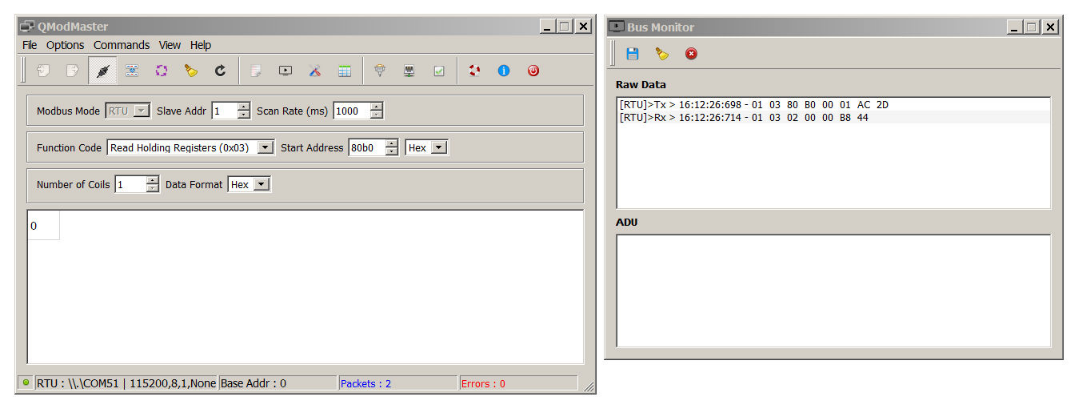
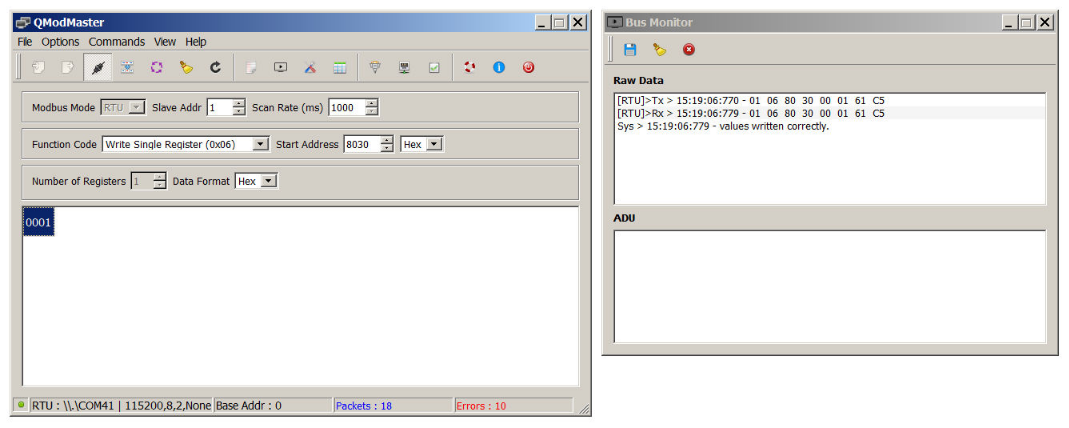
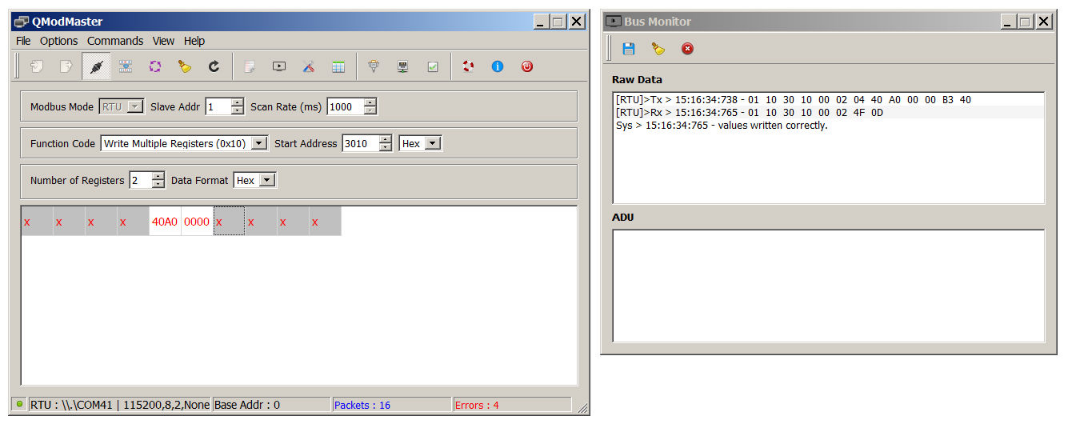
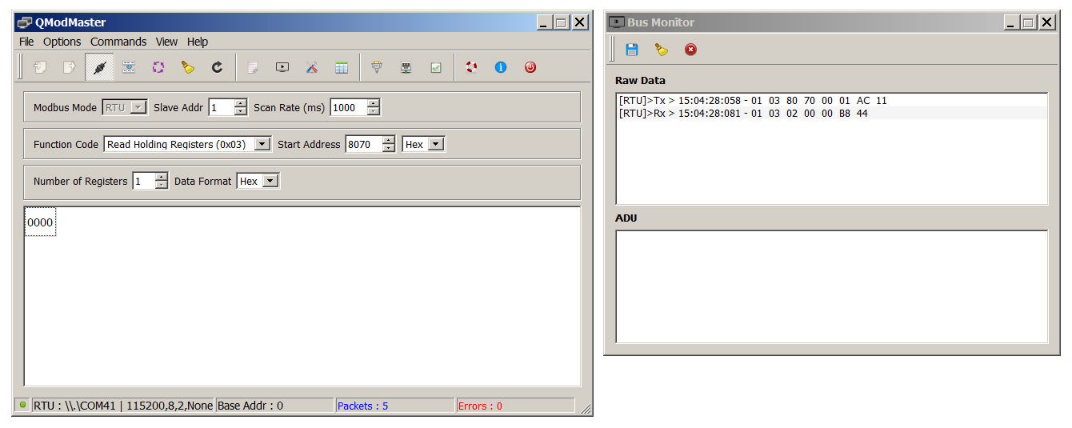
The SLx Series must be explicitly configured to communicate using the Modbus protocol. The factory default is SCPI Command Set, but can be changed from in the front panel menu Communication Setting-Command Protocol by selecting Modbus. Modbus messages are binary and traditional terminal programs (e.g., PuTTY, HyperTerminal) design for ASCII serial can not be used for communicating with SLx Series. For all the following examples, the open-source Modbus specific program, QModMaster was used to construct messages. Each example outlines a function, its arguments, the request, and the expected response. A screen capture showing field entries in QModMaster are also shown below.
10.7.1. Example Request Source Setpoint
Request |
Response |
||
|---|---|---|---|
Slave Address |
0x01 |
Slave Address |
0x01 |
Function Code |
0x03 |
Function Code |
0x03 |
Starting Address Hi |
0x80 |
Byte Count |
0x02 |
Starting Address Lo |
0xB0 |
Register Value Hi |
0x00 |
Register Count Hi |
0x00 |
Register Value Lo |
0x00 |
Register Count Lo |
0x01 |
CRC Lo |
0xB8 |
CRC Lo |
0xAC |
CRC Hi |
0x44 |
CRC Hi |
0x2D |
10.7.2. Example Set Front Panel Lock
Request |
Response |
||
|---|---|---|---|
Slave Address |
0x01 |
Slave Address |
0x01 |
Function Code |
0x06 |
Function Code |
0x06 |
Register Address Hi |
0x80 |
Register Address Hi |
0x80 |
Register Address Lo |
0x30 |
Register Address Lo |
0x30 |
Register Value Hi |
0x00 |
Register Value Hi |
0x00 |
Register Value Lo |
0x01 |
Register Value Lo |
0x01 |
CRC Lo |
0x61 |
CRC Lo |
0x61 |
CRC Hi |
0xC5 |
CRC Hi |
0xC5 |
10.7.3. Example Write Current Setpoint to 5.00
Request |
Response |
||
|---|---|---|---|
Slave Address |
0x01 |
Slave Address |
0x01 |
Function Code |
0x10 |
Function Code |
0x10 |
Starting Address Hi |
0x30 |
Starting Address Hi |
0x30 |
Starting Address Lo |
0x10 |
Starting Address Lo |
0x10 |
Register Count Hi |
0x00 |
Register Count Hi |
0x00 |
Register Count Lo |
0x02 |
Register Count Lo |
0x02 |
Byte Count |
0x04 |
CRC Lo |
0x4F |
Register Value Hi |
0x40 |
CRC Hi |
0x0D |
Register Value Lo |
0xA0 |
||
Register Value Hi |
0x00 |
||
Register Value Lo |
0x00 |
||
CRC Lo |
0xB3 |
||
CRC Hi |
0x40 |
10.7.4. Example Request Current Setpoint (5.00)
Request |
Response |
||
|---|---|---|---|
Slave Address |
0x01 |
Slave Address |
0x01 |
Function Code |
0x03 |
Function Code |
0x03 |
Starting Address Hi |
0x30 |
Byte Count |
0x04 |
Starting Address Lo |
0x20 |
Register Value Hi |
0x40 |
Register Count Hi |
0x00 |
Register Value Lo |
0x9F |
Register Count Lo |
0x02 |
Register Value Hi |
0xFF |
CRC Lo |
0xCA |
Register Value Lo |
0x60 |
CRC Hi |
0xCE |
CRC Lo |
0x9E |
CRC Hi |
0x05 |
10.8. Register List
The Modbus protocol consists of requests to specific register addresses stored in memory. Each register contains stored value in memory that can be read from or written to. When a Modbus request is sent by a master to a register address, the listening slave device will respond in one of two ways. If the master’s request was a read operation, the slave device will respond with the value stored at the register that was read. If the master’s request was a write operation, the slave device will set the registers to the requested value and will respond with a confirmation that the registers were written to.
For instance, if the current set point needs to be read, the request message must specify the register address 0x3020, and the listening slave device will respond with its current set point value. Table 2 lists all the register addresses.
Modbus Command |
Write Address |
Read Address |
Description |
|---|---|---|---|
N/A |
0x10B0 |
Returns the value of the Questionable Status register |
|
N/A |
0x10C0 |
Returns the value of the Operation Status register |
|
N/A |
0x10D0 |
Status Register |
|
0x10F0 |
0x1100 |
||
N/A |
0x2010 |
Measures and returns the average current at the sense location |
|
N/A |
0x2020 |
Measures and returns the average voltage at the sense location |
|
N/A |
0x2030 |
Measures and returns the instantaneous DC power at sense location |
|
0x3010 |
0x3020 |
Sets the current set-point |
|
0x3030 |
0x3040 |
Sets the voltage set-point |
|
0x3050 |
0x3060 |
Sets the power set-point |
|
0x4010 |
0x4020 |
Sets the over current trip (OCT) set-point |
|
0x4030 |
0x4040 |
Sets the over voltage trip (OVT) set-point |
|
0x4050 |
0x4060 |
Sets the over power trip (OPT) set-point |
|
0x4070 |
0x4080 |
Sets the under voltage trip (UVT) set-point |
|
0x5010 |
0x5020 |
Sets the rising slew rate for current when in current regulation state |
|
0x5030 |
0x5040 |
Sets the rising slew rate for voltage when in voltage regulation state |
|
0x5050 |
0x5060 |
Sets the rising slew rate for power when in power regulation state |
|
0x5090 |
0x50A0 |
Sets the falling slew rate for current when in current regulation state |
|
0x50B0 |
0x50C0 |
Sets the falling slew rate for voltage when in voltage regulation state |
|
0x50D0 |
0x50E0 |
Sets the falling slew rate for power when in power regulation |
|
0x8010 |
N/A |
Restores the factory EEPROM data |
|
0x8030 |
0x8020 |
Locks and unlocks the product from configuration and set-point changes |
|
0x8060 |
0x8070 |
Configures the sense location and automated compensation values |
|
0x8080 |
0x8090 |
Changes the communication protocol |
|
0x80A0 |
0x80B0 |
Sets the setpoint source |
|
0x80C0 |
0x80D0 |
Changes the MagnaLINK mode to allow for standalone or master-slave configuration |
|
0x80E0 |
N/A |
Reinitialize all connected slaves |
|
0x80F0 |
0x8100 |
Sets the cooling mode |
The Magna-Power implementation for Modbus limits reading/writing to one value (one to two registers) at a time. These registers must be adjacent in memory. For example, for measuring both current and voltage, two separate requests from the master device are needed – one for current and one for voltage.
10.8.1. StatusQuesQ
This command queries and returns the values of the Questionable Register. This read-only register holds the live (unlatched) questionable statuses of the MagnaDC power supply. Issuing this query does not clear the register. The bit configuration of the Questionable Register is shown in the table below.
- Address
0x10B0
- Function Code
0x03
- Access
Read
- Register Count
2
- Data Format
32-bit Integer
Questionable Register
Bit |
Weight |
Abbreviation |
Description |
|---|---|---|---|
0 |
1 |
OVP |
over voltage protection, hard fault |
1 |
2 |
OCT |
over current trip, soft fault |
2 |
4 |
OVT |
over voltage trip, soft fault |
3 |
8 |
OPT |
over power trip, soft fault |
4 |
16 |
OCP |
over current protection, hard fault |
5 |
32 |
OTP |
over temperature protection, hard fault |
6 |
64 |
RSL |
remote sense loss, soft fault |
7 |
128 |
SFLT |
soft fault, the ord value of all soft faults |
8 |
256 |
HFLT |
hard fault, the ord value of all hard faults |
9 |
512 |
ILOC |
interlock open, soft fault |
10 |
1024 |
IPL |
input power loss fault, hard fault |
11 |
2048 |
ADIF |
analog or digital input fault, hard fault |
10.8.2. StatusOperQ
This command queries and returns the values of the Operation Register. This read-only register holds the live (unlatched) operation statuses of the MagnaDC power supply. Issuing this query does not clear the register. The bit configuration of the Operation Register is shown in the table below.
- Address
0x10C0
- Function Code
0x03
- Access
Read
- Register Count
2
- Data Format
32-bit Integer
Operation Register
Bit |
Weight |
Abbreviation |
Description |
|---|---|---|---|
0 |
1 |
STBY |
standby |
1 |
2 |
EN |
enabled |
2 |
4 |
RSEN |
remote sense |
3 |
8 |
LOCK |
front panel locked |
4 |
16 |
CC |
constant current regulation, regulation status |
5 |
32 |
CV |
constant voltage regulation, regulation status |
6 |
64 |
CR |
constant resistance regulation, regulation status |
7 |
128 |
CP |
constant power regulation, regulation status |
10.8.3. StatusRegQ
This command queries the Status Register. This read-only register holds the live (unlatched) operation status of the MagnaDC power supply. Issuing a query does not clear the register. The register location and definitions are subject to change after any firmware release to accommodate new features. The Questionable Register is a subset of the status register and does not change between firmware updates. The present bit assignments are shown in the table below.
- Address
0x10D0
- Function Code
0x03
- Access
Read
- Register Count
4
- Data Format
32-bit Integer
Status Register
Bit |
Name |
Description |
|---|---|---|
0 |
standby |
output is in standby |
1 |
live |
output is active |
2 |
solenoidStatus |
aux power solenoid is open |
3 |
nonhalt2 |
available |
4 |
overCurrTrip |
over current trip |
5 |
overVoltTrip |
over voltage trip |
6 |
overPwrTrip |
over power trip |
7 |
remoteSenseLoss |
remote sense voltage outside of acceptable bounds |
8 |
underVoltTrip |
under voltage trip |
9 |
shutdown |
target is creating a shutdown condition |
10 |
linPwrLim |
power across linear modules exceed ratings |
11 |
resPwrLim |
power across resistors exceed ratings |
12 |
bootFailure |
one or multiple target did not boot up |
13 |
bootState |
one or more targets are waiting to boot |
14 |
phaseCurr |
rated phase current exceeded |
15 |
comm |
communications are corrupted |
16 |
overCurrProtect |
terminal current exceeded product rating |
17 |
overVoltProtect |
terminal voltage exceeded product rating |
18 |
tempRLin |
linear module exceeded temperature |
19 |
blownFuse |
fuse is blown on the auxiliary power supply |
20 |
interlock |
interlock open |
21 |
haltUserClear |
available |
22 |
maintenance |
maintenance |
23 |
tempDMod |
diode modules exceeded temperature |
24 |
incompatibleSysConfig |
incompatible system configuration |
25 |
stackOverflow |
exceeded firmware stack |
26 |
lineFault |
line fault analog/digital inputs |
27 |
tempRMod |
resistor module exceeded temperature |
28 |
belowRatedMinVolt |
below minimum voltage rating(28) |
29 |
outOfRegulation |
out of regulation, unexpected currents measured |
30 |
targetUpgrade |
mainctrl upgrading other targets |
31 |
haltSelfClear |
available |
32 |
phaseLoss |
one or more phase missing |
33 |
blownFuseInput |
input fuse blown on fuse/emi filter |
34 |
fanLockedRotor |
one or more fan’s rotor has locked |
35 |
notUsed29 |
available |
36 |
tempPwrMod |
power processing module temperature fault |
37 |
tempOutputMod |
output filter module temperature fault |
38 |
tempOutputCap |
output capacitors temperature fault |
39 |
tempTransformer |
transformer exceeded temperature fault |
40 |
notUsed26 |
available |
41 |
notUsed27 |
available |
42 |
notUsed28 |
available |
43 |
notUsed1 |
available |
44 |
notUsed2 |
available |
45 |
notUsed3 |
available |
46 |
notUsed4 |
available |
47 |
notUsed5 |
available |
48 |
invalidSysRating |
invalid system rating |
49 |
fwVersConflict |
firmware version conflict |
50 |
notUsed8 |
available |
51 |
notUsed9 |
available |
52 |
notUsed10 |
available |
53 |
notUsed11 |
available |
54 |
notUsed12 |
available |
55 |
notUsed13 |
available |
56 |
notUsed14 |
available |
57 |
notUsed15 |
available |
58 |
notUsed16 |
available |
59 |
notUsed17 |
available |
60 |
notUsed18 |
available |
61 |
notUsed19 |
available |
62 |
notUsed20 |
available |
63 |
notUsed21 |
available |
10.8.4. Output
This command enables or disables the MagnaDC power supply output. A 1 indicates the product’s power processing circuit is active and processing power, while and a 0 indicates the power supply is in standby or faulted state.
- Address
0x10F0
- Function Code
0x06
- Access
Write
- Register Count
1
- Parameters
0 (OFF) | 1 (ON)
- Data Format
Boolean
- Query Address
0x1100
- Function Code
0x03
- Access
Read
- Register Count
1
- Data Format
16-bit Integer
10.8.5. MeasCurrQ
This query commands the MagnaDC power supply to measure and return the average current through the DC terminals.
- Address
0x2010
- Function Code
0x03
- Access
Read
- Register Count
2
- Data Format
32-bit Floating Point Number
10.8.6. MeasVoltQ
This query commands commands the MagnaDC power supply to measure and return the average voltage at the DC terminals. If the remote sense function is used and engaged, this command returns the voltage measured at the sense terminals.
- Address
0x2020
- Function Code
0x03
- Access
Read
- Register Count
2
- Data Format
32-bit Floating Point Number
10.8.7. MeasPwrQ
This query commands commands the MagnaDC power supply to measure and return the average power at the DC terminals.
- Address
0x2030
- Function Code
0x03
- Access
Read
- Register Count
2
- Data Format
32-bit Floating Point Number
10.8.8. SetpointCurr
This command programs the current set-point that the MagnaDC power supply will regulate to when operating in constant current mode.
- Address
0x3010
- Function Code
0x10
- Access
Write
- Register Count
2
- Parameters
0 through MAX | MINimum | MAXimum
- Data Format
32-bit Floating Point Number
- Query Address
0x3020
- Function Code
0x03
- Access
Read
- Register Count
2
- Data Format
32-bit Floating Point Number
10.8.9. SetpointVolt
This command programs the voltage set-point, in volts, which the MagnaDC power supply will regulate to when operating in constant voltage mode.
- Address
0x3030
- Function Code
0x10
- Access
Write
- Register Count
2
- Parameters
0 through MAX | MINimum | MAXimum
- Data Format
32-bit Floating Point Number
- Query Address
0x3040
- Function Code
0x03
- Access
Read
- Register Count
2
- Data Format
32-bit Floating Point Number
10.8.10. SetpointPwr
This command programs the power set-point, in watts, which the MagnaDC power supply will regulate to when operating in constant power mode.
- Address
0x3050
- Function Code
0x10
- Access
Write
- Register Count
2
- Parameters
0 through MAX | MINimum | MAXimum
- Data Format
32-bit Floating Point Number
- Query Address
0x3060
- Function Code
0x03
- Access
Read
- Register Count
2
- Data Format
32-bit Floating Point Number
10.8.11. OverTripCurr
This command programs the over current trip (OCT) set-point. If the input current exceeds the over current trip set-point for multiple samples, the input is disconnected and an OCT fault is indicated.
- Address
0x4010
- Function Code
0x10
- Access
Write
- Register Count
2
- Parameters
0 through MAX | MINimum | MAXimum
- Data Format
32-bit Floating Point Number
- Query Address
0x4020
- Function Code
0x03
- Access
Read
- Register Count
2
- Data Format
32-bit Floating Point Number
10.8.12. OverTripVolt
This command programs the over voltage trip (OVT) set-point. If the input voltage exceeds the over voltage trip set-point for multiple samples, the input is disconnected and an OVT fault is indicated.
- Address
0x4030
- Function Code
0x10
- Access
Write
- Register Count
2
- Parameters
0 through MAX | MINimum | MAXimum
- Data Format
32-bit Floating Point Number
- Query Address
0x4040
- Function Code
0x03
- Access
Read
- Register Count
2
- Data Format
32-bit Floating Point Number
10.8.13. OverTripPwr
This command programs the over power trip (OPT) set-point. If the input power exceeds the over power trip set-point for multiple sample, the input is disconnected and an OPT fault is indicated.
- Address
0x4050
- Function Code
0x10
- Access
Write
- Register Count
2
- Parameters
0 through MAX | MINimum | MAXimum
- Data Format
32-bit Floating Point Number
- Query Address
0x4060
- Function Code
0x03
- Access
Read
- Register Count
2
- Data Format
32-bit Floating Point Number
10.8.14. UnderTripVolt
This command programs the under voltage trip (UVT) set-point. If the input voltage falls below the under voltage trip set-point for multiple samples, the input is disconnected and an UVT fault is indicated.
- Address
0x4070
- Function Code
0x10
- Access
Write
- Register Count
2
- Parameters
0 through MAX | MINimum | MAXimum
- Data Format
32-bit Floating Point Number
- Query Address
0x4080
- Function Code
0x03
- Access
Read
- Register Count
2
- Data Format
32-bit Floating Point Number
10.8.15. RiseRampCurr
This command sets the current slew rate for increasing current transitions while in constant current regulation. MAXimum sets the slew to the fastest possible rate. MINimum sets the slew to the slowest rate. Slew rates less than the minimum value are set to MINimum. Slew rate settings less than the minimum value are set to MINimum. Slew rate settings greater than the maximum value are set to MAXimum.
- Address
0x5010
- Function Code
0x10
- Access
Write
- Register Count
2
- Parameters
1 to MAXimum [A/ms] | MAXimum | MINimum
- Data Format
32-bit Floating Point Number
- Query Address
0x5020
- Function Code
0x03
- Access
Read
- Register Count
2
- Data Format
32-bit Floating Point Number
10.8.16. RiseRampVolt
This command sets the voltage slew rate for increasing voltage transitions while in constant voltage regulation. The units for voltage slew rate are volts per millisecond. MAXimum sets the slew to the fastest possible rate. MINimum sets the slew to the slowest rate. Slew rates less than the minimum value are set to MINimum. Slew rate settings less than the minimum value are set to MINimum. Slew rate settings greater than the maximum value are set to MAXimum.
- Address
0x5030
- Function Code
0x10
- Access
Write
- Register Count
2
- Parameters
1 to MAXimum [V/ms] | MAXimum | MINimum
- Data Format
32-bit Floating Point Number
- Query Address
0x5040
- Function Code
0x03
- Access
Read
- Register Count
2
- Data Format
32-bit Floating Point Number
10.8.17. RiseRampPwr
This command sets the power slew rate for increasing power transitions while in constant power regulation. The units for power slew rate are watts per millisecond. MAXimum sets the slew to the fastest possible rate. MINimum sets the slew to the slowest rate. Slew rates less than the minimum value are set to MINimum. Slew rate settings less than the minimum value are set to MINimum. Slew rate settings greater than the maximum value are set to MAXimum.
- Address
0x5050
- Function Code
0x10
- Access
Write
- Register Count
2
- Parameters
1 to MAXimum [W/ms] | MAXimum | MINimum
- Data Format
32-bit Floating Point Number
- Query Address
0x5060
- Function Code
0x03
- Access
Read
- Register Count
2
- Data Format
32-bit Floating Point Number
10.8.18. FallRampCurr
This command sets the current slew rate for decreasing current transitions while in constant current regulation. MAXimum sets the slew to the fastest possible rate. MINimum sets the slew to the slowest rate. Slew rates less than the minimum value are set to MINimum. Slew rate settings less than the minimum value are set to MINimum. Slew rate settings greater than the maximum value are set to MAXimum.
- Address
0x5090
- Function Code
0x10
- Access
Write
- Register Count
2
- Parameters
1 to MAXimum [A/ms] | MAXimum | MINimum
- Data Format
32-bit Floating Point Number
- Query Address
0x50A0
- Function Code
0x03
- Access
Read
- Register Count
2
- Data Format
32-bit Floating Point Number
10.8.19. FallRampVolt
This command sets the voltage slew rate for decreasing voltage transitions while in constant voltage regulation. The units for voltage slew rate are volts per millisecond. MAXimum sets the slew to the fastest possible rate. MINimum sets the slew to the slowest rate. Slew rates less than the minimum value are set to MINimum. Slew rate settings less than the minimum value are set to MINimum. Slew rate settings greater than the maximum value are set to MAXimum.
- Address
0x50B0
- Function Code
0x10
- Access
Write
- Register Count
2
- Parameters
1 to MAXimum [V/ms] | MAXimum | MINimum
- Data Format
32-bit Floating Point Number
- Query Address
0x50C0
- Function Code
0x03
- Access
Read
- Register Count
2
- Data Format
32-bit Floating Point Number
10.8.20. FallRampPwr
This command sets the power slew rate for decreasing power transitions while in constant power regulation. The units for power slew rate are watts per millisecond. MAXimum sets the slew to the fastest possible rate. MINimum sets the slew to the slowest rate. Slew rates less than the minimum value are set to MINimum. Slew rate settings less than the minimum value are set to MINimum. Slew rate settings greater than the maximum value are set to MAXimum.
- Address
0x50D0
- Function Code
0x10
- Access
Write
- Register Count
2
- Parameters
1 to MAXimum [W/ms] | MAXimum | MINimum
- Data Format
32-bit Floating Point Number
- Query Address
0x50E0
- Function Code
0x03
- Access
Read
- Register Count
2
- Data Format
32-bit Floating Point Number
10.8.21. FactoryRestore
This command performs a factory restore to default EPROM values. Both Soft Restore and Hard Restore are available through command parameters.
- Address
0x8010
- Function Code
0x06
- Access
Write
- Register Count
1
- Parameters
1 (Soft Restore) | 2 (Hard Restore)
- Data Format
16-bit Integer
10.8.22. Lock
This command configures the MagnaDC power supply’s lock state. While locked, the stop button is the only functional button on the front panel. See Lock for more details on how lock works and how behaves relative to other locking inputs (front panel and digital input).
- Address
0x8030
- Function Code
0x06
- Access
Write
- Register Count
1
- Parameters
0 (OFF) | 1 (ON)
- Data Format
Boolean
- Query Address
0x8020
- Function Code
0x03
- Access
Read
- Register Count
1
- Data Format
16-bit Integer
10.8.23. SenseMode
This command configures where the MagnaDC power supply senses voltage. The sense location also effects how power and resistance are calculated. Local sensing monitors the directly across the output terminals. Remote sensing, as described in Remote Sense Connection, measures across the terminal JS2. This external connection can be used to improve regulation at the point of load, as is needed for example, in compensating voltage drops caused by wire resistance.
- Address
0x8060
- Function Code
0x06
- Access
Write
- Register Count
1
- Parameters
0 (local) | 1 (remote)
- Data Format
16-bit Integer
- Query Address
0x8070
- Function Code
0x03
- Access
Read
- Register Count
1
- Data Format
16-bit Integer
10.8.24. CommProt
This command changes the command protocol of the MagnaDC power supply.
- Address
0x8080
- Function Code
0x06
- Access
Write
- Register Count
1
- Parameters
0 (SCPI) | 1 (MagnaLINK) | 2 (Modbus) | 3 (Industrial Networks)
- Data Format
16-bit Integer
- Query Address
0x8090
- Function Code
0x03
- Access
Read
- Register Count
1
- Data Format
16-bit Integer
10.8.25. SetSource
The command selects and routes different set points sources to the digital controller. Operation of this feature is described in Set Point Source. By default, the source is set to local (value 0), where set points originating from the front panel or communication interfaces are routed to the SLx Series digital control. When the source is set to function generator (value 1), set points are generated internally, by a periodic function generator block. When external analog input (value 3) is set, the voltage(s) applied to the rear connector are converted into set points.
- Address
0x80A0
- Function Code
0x06
- Access
Write
- Register Count
1
- Parameters
0 (local) | 1 (function generator) | 2 (external analog input)
- Data Format
16-bit Integer
- Query Address
0x80B0
- Function Code
0x03
- Access
Read
- Register Count
1
- Data Format
16-bit Integer
10.8.26. MagnaLinkMode
This command changes the MagnaLINK mode to allow for standalone or master-slave configurations.
- Address
0x80C0
- Function Code
0x06
- Access
Write
- Register Count
1
- Parameters
0 (Standalone) | 1 (Parallel) | 2 (Series)
- Data Format
16-bit Integer
- Query Address
0x80D0
- Function Code
0x06
- Access
Write
- Register Count
1
- Data Format
16-bit Integer
10.8.27. MagnaLinkReinit
This command should be used to reinitialize system ratings when a slave is added or removed from a master-slave configuration.
- Address
0x80E0
- Function Code
0x06
- Access
Write
- Register Count
1
- Parameters
0 | 1
- Data Format
16-bit Integer
10.8.28. CoolingMode
This command configures the MagnaDC power supply’s cooling mode. In Automatic Cooling mode (value 0), the cooling output is regulated automatically based on internal operating conditions. In Maximum Cooling mode (value 1), the cooling output is forced on at full capacity. When queried, the command returns two comma-separated values: the configured cooling mode followed by the current solenoid state (0 = OFF, 1 = ON) on water-cooled units, or 0 on air-cooled units.
- Address
0x80F0
- Function Code
0x06
- Access
Write
- Register Count
1
- Parameters
0 (Automatic Cooling) | 1 (Maximum Cooling)
- Data Format
16-bit Integer
- Query Address
0x8100
- Function Code
0x03
- Access
Read
- Register Count
2
- Data Format
16-bit Integer