1.6.1. Over Voltage Trip (OVT)
The SLx Series MagnaDC power supply has a programmable Over Voltage Trip setting used to shutdown the product if an undesired maximum voltage value is measured across the DC input. The OVT setting can be adjusted to a maximum of 110% of the specific MagnaDC power supply’s full scale voltage rating. An over-voltage condition must be sustained for multiple samples for the OVT fault to register.
When an OVT fault occurs, the DC input bus is disconnected via an internal switching device, leaving the MagnaDC power supply in an open-circuit faulted condition with an OVT alarm shown on the auxiliary display. To resume operation, the DC input voltage must be drop below the MagnaDC power supply’s OVT setting, the Clear function must be issued, and the input re-energized with the Start function.
The OVT setting can be programmed through the front panel’s auxiliary display, through one of the four analog inputs, or programmatically through software.
The factory default OVT setting is 110% of the specific MagnaDC power supply’s maximum voltage rating.
1.6.2. Under Voltage Trip (UVT)
The SLx Series MagnaDC power supply has a programmable Under Voltage Trip setting used to shutdown the product if an undesired minimum voltage threshold is measured across the DC input. The UVT setting can be adjusted to a minimum of 5% of the specific MagnaDC power supply’s full scale voltage rating. An under-voltage condition must be sustained for multiple samples for the UVT fault to register.
The UVT setting was designed to protect DC input sources, such as batteries, from discharging below a minimum desired voltage. If the UVT setting is used, upon first enabling the DC input the DC input voltage must be above the UVT setting or the MagnaDC power supply will trip immediately. Fig. 1.10 shows the operating range with both OVT and UVT enabled.
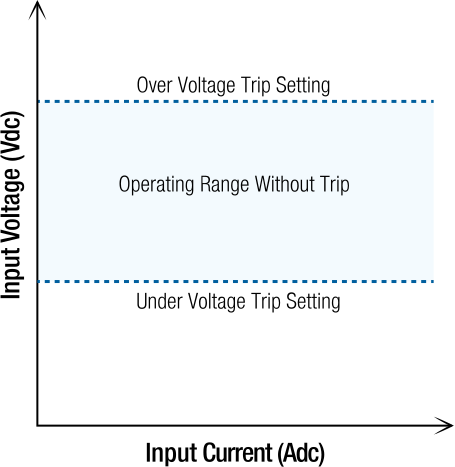
Fig. 1.10 Operating region without trip when OVT and UVT settings are enabled
When an UVT fault occurs, the DC input bus is disconnected via an internal switching device, leaving the MagnaDC power supply in an open-circuit faulted condition with an UVT alarm shown on the auxiliary display. To resume operation, the Clear function must be issued and the input re-energized with the Start function.
The UVT setting can be programmed through the front panel’s auxiliary display, through one of the four analog inputs, or programmatically through software.
The factory default UVT setting is 0 Vdc, which disables the UVT protection.
1.6.3. Over Current Trip (OCT)
The SLx Series MagnaDC power supply has a programmable Over Current Trip setting used to shutdown the product if an undesired maximum current value is measured through the DC input. The OCT setting can be adjusted to a maximum of 110% of the specific MagnaDC power supply’s full scale voltage rating. An over current condition must be sustained for multiple samples for the OCT fault to register.
When an OCT fault occurs, the DC input bus is disconnected via an internal switching device, leaving the MagnaDC power supply in an open-circuit faulted condition with an OCT alarm shown on the auxiliary display. To resume operation, the DC input current must be drop below the MagnaDC power supply’s OCT setting, the clear function must be issued, and the input re-energized with the start function.
The OCT setting can be programmed through the front panel’s auxiliary display, through one of the four analog inputs, or programmatically through software.
1.6.4. Over Power Trip (OPT)
The SLx Series MagnaDC power supply has a programmable Over Power Trip setting used to shutdown the product if an undesired maximum power value is measured at the DC input. The OPT setting can be adjusted to a maximum of 110% of the specific MagnaDC power supply’s full scale power rating. An over-power condition must be sustained for multiple samples for the OPT fault to register.
When an OPT fault occurs, the DC input bus is disconnected via an internal switching device, leaving the MagnaDC power supply in an open-circuit faulted condition with an OPT alarm shown on the auxiliary display. To resume operation, the DC input voltage must be drop below the MagnaDC power supply’s OPT setting, the Clear function must be issued, and the input re-energized with the Start function.
The OPT setting can be programmed through the front panel’s auxiliary display, through one of the four analog inputs, or programmatically through software.
The factory default OPT setting is 110% of the specific MagnaDC power supply’s maximum power rating.
1.6.5. Thermal Fault
The SLx Series MagnaDC power supply has internal thermistors on its various heatsinks to ensure operation at temperatures within the product’s design specifications. A thermal fault typically results from one of the following conditions:
Operating in an environment above the maximum ambient temperature specification.
Operating in an environment below the minimum ambient temperature specification.
Blocking the front panel air intake.
Internal fan or solenoid failure.
Broken electrical contact to thermistors.
Coolant intake temperatures are above those recommended.
When a thermal fault occurs, the MagnaDC power supply enters into a hard-fault condition, where all loads disconnect from the source. The user is prevent from enabling the load through the front panel and external interfaces. Details about the thermal fault are shown on the front display.
To resume operation, the product must be power cycled, by toggling the rocker switch located on the front panel. Allow sufficient time for the MagnaDC power supply to return to safe operating temperatures. Otherwise, the product will enter immediately into a thermal fault after booting.
1.6.6. Interlock
The Interlock feature disables the MagnaDC power supply by entering a soft fault state. The safety feature is triggered whenever the +5V signal applied to the interlock pin is broken. By default, interlock is disabled when the MagnaDC power supply ships from the factory. Interlock can be enabled from the front panel, computer interface. Once interlock is assigned to one of the pins listed in external user I/O +5V must be present to operate the product. There are two method to providing +5V to the interlock pin:
Providing a physical short from the provided external user I/O +5V signal (Pin 14) to the interlock digital input.
Using an external user supplied +5V signal with reference to the external user I/O GND signal (Pin 25).
With either method, an external dry contact may be used to trigger the interlock.
When the +5V interlock signal is broken, the dissipative elements are switched out of the DC bus using a high-speed switching device, the MagnaDC power supply is placed in a soft fault state.
To resume normal operation, the +5V signal must first be restored to the interlock input and the Clear command issued.
1.6.7. Lock
The lock feature prevents inadvertent changes to MagnaDC power supply operation by disabling front panel button inputs. Lock can be enabled through the front panel using the LOCK button, through the communications interface using SCPI commands, and the rear-external interface using a +5V signal. In all cases, the LOCK button will illuminate to show the MagnaDC power supply is lock. Also, and the stop button always functions normally (for safety). The digital input lock takes highest priority, such that when locked, it can be unlocked only by the digital input. Second priority is SCPI followed by the LOCK button. The table below illustrates unlocking behavior for a locked MagnaDC power supply.
Locked by Front Panel |
Locked by SCPI |
Locked by Digital Input |
|
|---|---|---|---|
Front Panel Unlock |
✓ |
||
SCPI Unlock |
✓ |
✓ |
|
Digital Input Unlock |
✓ |
1.6.8. User I/O Alarm
The SLx Series MagnaDC power supply monitors analog and digital input voltages on the 26-pin User I/O connections to ensure that they are within the each pin’s respective voltage range. A User I/O alarm will be triggered in the event a voltage input on one of these pins exceeds 110% of the specific input’s range, further described by the table below:
User I/O Pins |
Description |
Nominal Voltage Range |
User I/O Alarm Voltage |
|---|---|---|---|
11, 12, 23, 24 |
Digital Inputs |
0 - 5 V |
> 5.5 V |
5, 6, 17, 18 |
Analog Inputs |
0 - 10 V |
> 11 V |
When an User I/O fault occurs, the DC input bus is disconnected via an internal switching device, leaving the MagnaDC power supply in an open-circuit faulted condition with an User I/O alarm shown on the auxiliary display. To resume operation the input voltages on the 25-pin User I/O must return to the each pin’s respective nominal input voltage range, the Clear function must be issued and the input re-energized with the Start function.