4.6.10. Emergency Stop (E-Stop)
The emergency stop (e-stop) is a hard-wired safety feature in the MagnaDC power supply that quickly and definitively cuts electrical power to both the control circuitry and power stages. When activated, the shutdown behavior mirrors that of switching the front panel rocker switch to the off position. The e-stop is triggered on loss of a 24 VDC input signal on the external user I/O, between pins 13 and 26.
By default, products leave the factory with the e-stop feature disabled. In this default state, the black rocker switch is the only means of turning the product on and off. To enable the e-stop feature, follow these steps:
Remove AC power to the product by either turning off the AC circuit breaker feeding the product or removing the green plug on the rear of the product labeled AC INPUT.
Switch the power rocker into the ON position.
Wait for 3 minutes allowing time for internally stored energy to discharge from the power circuits.
Unscrew the test access panel cover located on the left-hand side of the product, right behind the mounting ear.
Remove the black plastic jumper, JP1, situated at the top of the opening.
Reinstall the cover upon completion.
Warning
Failure to disconnect AC power and wait 3 minutes could result in electrical shock when accessing the assembly behind the test access panel.
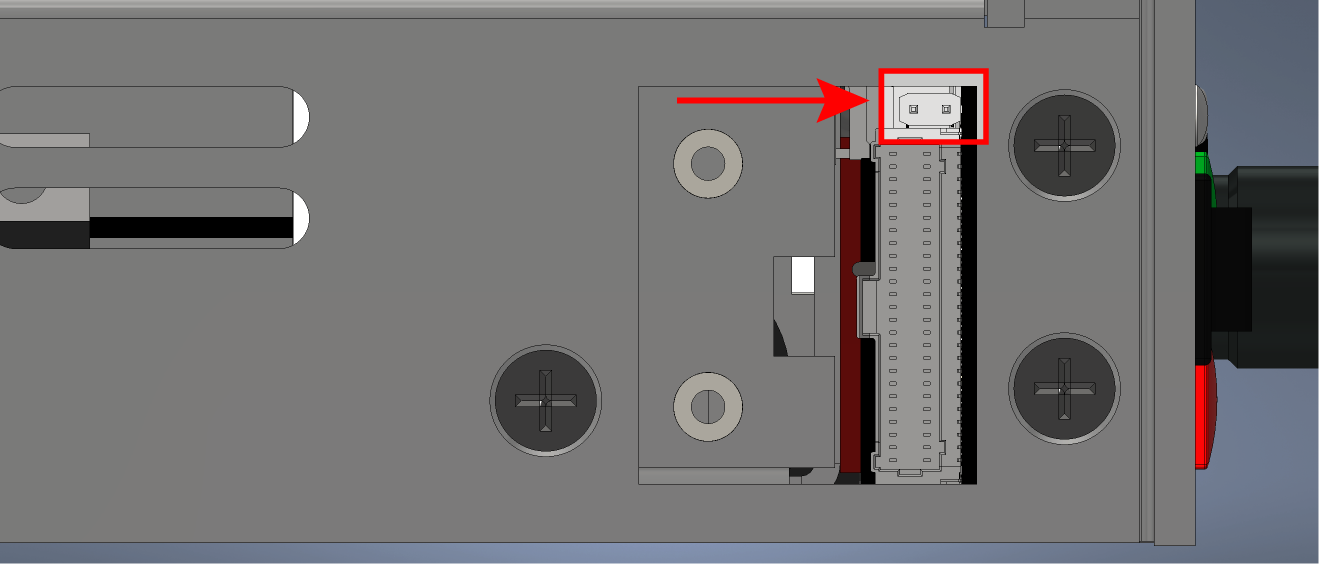
Fig. 4.12 Test access panel with protective cover removed and a red arrow to indicate e-stop jumper
The rocker, jumper, and e-stop (inputs) form a hard-wired electrical circuit. The resulting product state will depend on the input conditions as shown in the E-Stop Product State Table.
4.6.10.1. E-Stop Product State Table
E-Stop |
Power Rocker |
Jumper (JP1) |
Product State |
|---|---|---|---|
+24V |
off |
removed |
off |
+24V |
on |
removed |
on |
0V |
off |
removed |
off |
0V |
on |
removed |
off |
X |
off |
installed |
off |
X |
on |
installed |
on |