14.1. PROFINET Overview
PROFINET, short for Process Field Network, is a widely used industrial Ethernet-based communication protocol that enables efficient and robust data exchange in industrial automation systems. It is an open standard developed and maintained by PROFIBUS & PROFINET International, an organization dedicated to industrial communication technologies. Designed to meet the growing demands of modern industrial automation, PROFINET offers real-time communication capabilities, high-speed data transfer, and seamless integration with various automation devices and systems. It provides a flexible and scalable solution for connecting field devices, controllers, sensors, and actuators across different levels of an industrial network. Magna-Power devices support are version of PROFINET with isochronous real time (IRT), which handles time-critical data exchange, capable of cycle times down to 31.25 μs and 1 μs of jitter.
Key Features and Benefits:
High Performance: PROFINET offers real-time communication with deterministic behavior, ensuring precise synchronization and timely data exchange. It supports high-speed data transfer rates, allowing for rapid control and monitoring of industrial processes.
Flexibility and Scalability: PROFINET provides a flexible network architecture that adapts to the changing requirements of industrial environments. It supports various topologies, including line, star, ring, and tree, enabling easy expansion and integration of devices and systems. Additionally, PROFINET supports the use of standard Ethernet infrastructure, simplifying network deployment and maintenance.
Seamless Integration: PROFINET enables seamless integration of different devices and systems, regardless of the manufacturer or technology used. It supports interoperability between PROFINET-enabled devices and other industrial protocols, facilitating communication between heterogeneous systems.
Diagnostics and Maintenance: PROFINET offers extensive diagnostic capabilities, allowing users to monitor the network health, detect faults, and perform maintenance tasks efficiently. It provides real-time status information, device parameterization, and remote access for troubleshooting, reducing downtime and improving overall system reliability.
Safety and Security: PROFINET incorporates robust security mechanisms to protect industrial networks and data. It supports encryption, authentication, and access control, ensuring the confidentiality and integrity of transmitted information. Additionally, PROFINET includes safety extensions for implementing safety-related applications, complying with relevant safety standards.
Integration with IT Systems: PROFINET bridges the gap between operational technology, information technology (IT) systems. It enables seamless integration with enterprise-level systems, such as Manufacturing Execution Systems (MES) or Enterprise Resource Planning (ERP) systems, providing valuable data for analysis, optimization, and decision-making.
For a more complete overview of PROFINET and underlining standards, visit PROFIBUS.com .
14.1.1. General Station Description
When developing or using PROFINET software to talk to a Magna-Power Electronics PROFINET module, a general station description (GSD) should be imported into PLC development software. The GSD si a custom file created by the device manufacturer that describes communication parameters, available services, data types, and device identification. The file may be requested as part of the setup process in PLC progromming or installing third-party software. The GSD can be download below and was use for Communication Examples.
14.2. Physical Interface
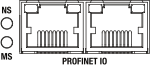
Fig. 14.1 Rear interface
14.2.1. Ethernet Ports
The DBx Module has two 100 Mbps RJ-45 Ethernet ports on the rear of the unit for PROFINET communications, shown in Rear interface labeled PROFINET IO. Either port may be used, with the other port acting as an Ethernet passthrough.
14.2.2. LED Codes
In the rear of the DBx Module is a communications interface with two exposed bi-color LEDs. The LED labeled NS indicates network status and the one labeled MS indicates module status, as shown in Rear interface. Status is indicated using colors and blink patterns, as shown in the tables below.
State |
Description |
|---|---|
Off |
Offline |
Green |
Online (RUN state) |
Green, 1 flash |
Online (STOP state) |
Green, cont. flash |
DCP identify |
Red |
Fatal error |
Red, 1 flash |
Station name error |
Red, 2 flashes |
IP address error |
Red, 3 flashes |
Configuration error |
State |
Description |
|---|---|
Off |
Not initialized |
Green |
Normal operation |
Green, 1 flash |
Diagnostic event |
Red |
Exception error (fatal when combined with red NS LED) |
The RJ-45 Ethernet ports have two LEDs that indicate the status of the Ethernet connection. Link and activity status are indicated using colors and blink patterns, as shown in the tables below.
State |
Description |
|---|---|
Off |
No link |
Green |
Ethernet link (100 Mbps) established |
Green, flashing |
Activity (100 Mbps) |
State |
Description |
|---|---|
Off |
No link |
Orange |
Ethernet link (10 Mbps) established |
Orange, flashing |
Activity (10 Mbps) |
14.3. Communication Examples
Work in progress