

5.7. Calibration
MagnaCTRL can read and adjust the SLx Series MagnaDC power supply’s calibration values through the Calibration side menu. The values are grouped into Control Gains, Feedback Sensors, Analog Inputs, and Miscellaneous sections, shown in Fig. 5.7. Each value can be stepped a single increment with its increment and decrement buttons or typed in directly, then committed to nonvolatile memory with its save button; Save All writes every edited value at once.
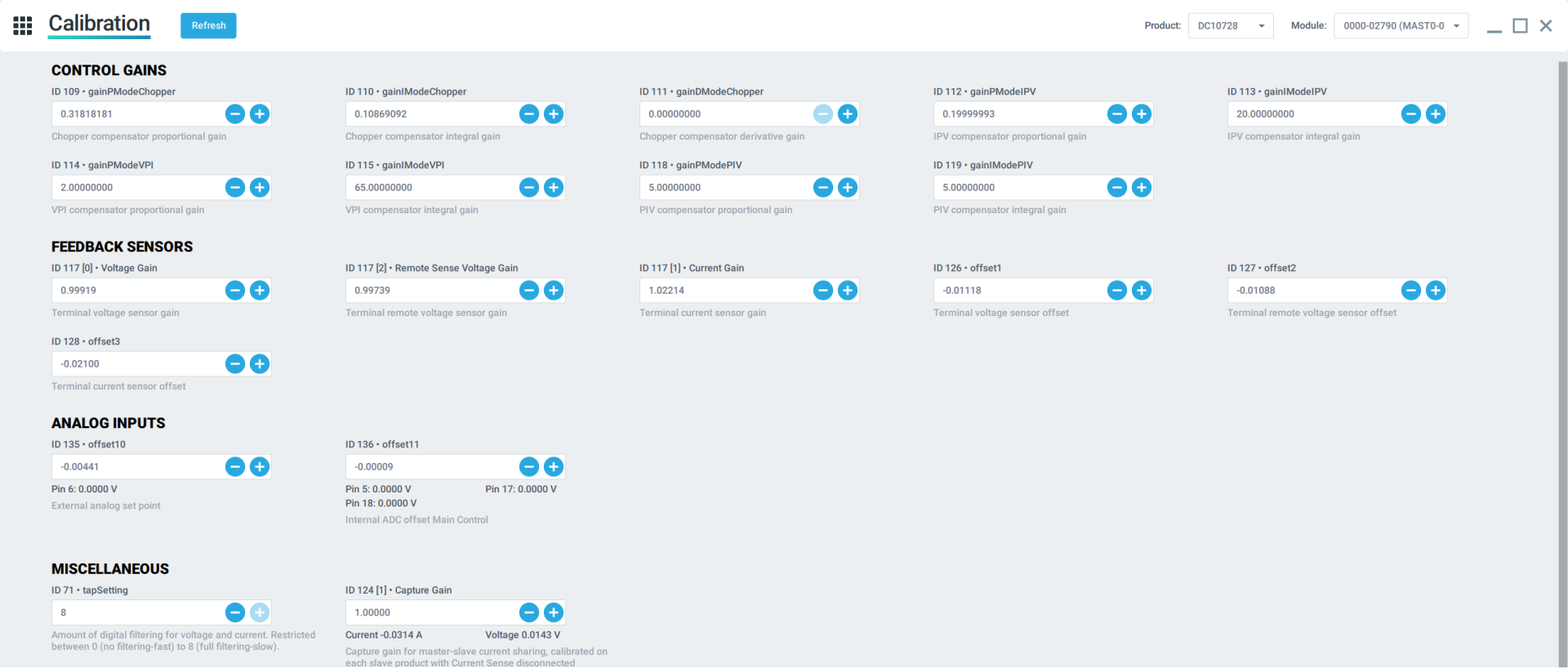
Fig. 5.7 The Calibration menu in MagnaCTRL, with values grouped into Control Gains, Feedback Sensors, Analog Inputs, and Miscellaneous sections
Caution
Calibration should only be performed in strict adherence to Magna-Power Electronics’s documented calibration procedure. Failure to calibrate the product properly, or manipulation of these values, can result in undesired performance and damage to attached products.
5.7.1. Calibration values
Each calibration value is stored in the SLx Series MagnaDC power supply’s nonvolatile memory as an eMem entry. The tables below list each value with its ID, factory default, and description. Descriptions come verbatim from the firmware eMem table. Gains are shown in engineering units, converted from the stored fixed-point value: control gains store as Q0_32_24 (raw / 2^24) and sensor gains store as Q1_32_16 (65536 = 1.0). Offsets are raw counts: a value less than zero reduces the reading, and a value greater than zero raises it.
5.7.1.1. Control Gains
Value |
ID |
Default |
Description |
|---|---|---|---|
|
ID 114 |
2 |
VPI compensator proportional gain. Based on Control Mode calibration results |
|
ID 115 |
15 |
VPI compensator integral gain. Based on Control Mode calibration results |
|
ID 112 |
0.2 |
IPV compensator proportional gain. Based on Control Mode calibration results |
|
ID 113 |
20 |
IPV compensator integral gain. Based on Control Mode calibration results |
|
ID 118 |
0.01 |
PIV compensator proportional gain |
|
ID 119 |
5 |
PIV compensator integral gain |
5.7.1.2. Control Gains, ALx products only
Value |
ID |
Default |
Description |
|---|---|---|---|
|
ID 120 |
0.001 |
Shunt regulator compensator proportional gain1 |
|
ID 121 |
5 |
Shunt regulator compensator integral gain1 |
|
ID 122 |
0.01 |
Shunt regulator compensator band |
|
ID 116 |
0.01 |
RPIV compensator proportional gain |
|
ID 117 |
60 |
RPIV compensator integral gain |
5.7.1.3. Control Gains, SLx products only
Value |
ID |
Default |
Description |
|---|---|---|---|
|
ID 109 |
0.3 |
Chopper compensator proportional gain |
|
ID 110 |
0.3 |
Chopper compensator integral gain |
|
ID 111 |
0 |
Chopper compensator derivative gain |
5.7.1.4. Feedback Sensors
Value |
ID |
Default |
Description |
|---|---|---|---|
|
ID 126 |
-590 |
Terminal voltage sensor offset. Adjust to calibrate terminal Voltage at lower end. Value less than zero will reduce the measurement and vice-versa. |
|
ID 127 |
-590 |
Terminal remote voltage sensor offset. Adjust to calibrate remote Voltage at lower end. Value less than zero will reduce the measurement and vice-versa. |
|
ID 128 |
0 |
Terminal current sensor offset. Adjust to calibrate terminal Current at lower end. Value less than zero will reduce the measurement and vice-versa. |
Voltage Gain |
ID 117 [0] |
1 |
[Voltage Gain; Current Gain; Remote Sense Voltage Gain; Phase Current Gain] |
Current Gain |
ID 117 [1] |
1 |
[Voltage Gain; Current Gain; Remote Sense Voltage Gain; Phase Current Gain] |
Remote Sense Voltage Gain |
ID 117 [2] |
1 |
[Voltage Gain; Current Gain; Remote Sense Voltage Gain; Phase Current Gain] |
5.7.1.5. Analog Inputs
Value |
ID |
Default |
Description |
|---|---|---|---|
|
ID 135 |
0 |
External analog set point |
|
ID 136 |
0 |
Internal ADC offset Main Control |
5.7.1.6. Analog Outputs
Value |
ID |
Default |
Description |
|---|---|---|---|
|
ID 140 |
0 |
External DAC offset Main Control. This Q1_16_16 value is summed into all four IO connector analog outputs to calibrate out their DC offset. |
5.7.1.7. Miscellaneous
Value |
ID |
Default |
Description |
|---|---|---|---|
|
ID 71 |
8 |
Amount of digital filtering for voltage and current. Restricted between 0 (no filtering-fast) to 8 (full filtering-slow). Default value set to 8. Decrease to reduce filtering. |
Capture Gain |
ID 124 [1] |
1 |
[Set-point PWM Gain; Capture PWM Gain; available; available; available]. To adjust chopper PWM increase setpoint PWM gain greater than 1, example 1.05 |
5.7.2. Master-Slave Capture Gain
In a master-slave system, each slave’s Capture Gain (ID 124 [1], in the Miscellaneous section) sets how that unit shares the total system current. It is calibrated on each slave with the Current Sense cable disconnected, so that every unit delivers an equal share of the load.
Recalibrate the capture gain after replacing a slave or its control board, after a hard Factory Restore, or whenever current is shared unevenly between units.
Equipment and setup
A resistive load bank sized for the full system load, approximately the rated voltage divided by the rated system current. Select the nearest resistance no greater than this value and no more than 20% below it.
The Current Sense cable disconnected on every unit.
All product outputs wired in parallel into the shared load bank.
Procedure
Connect MagnaCTRL to the master and open the Calibration side menu.
Disconnect the Current Sense cable on every unit and wire all outputs in parallel into the shared load bank.
Command 95% of rated current and enable the output. Sized as above, the load bank holds the system below its rated voltage, in Auto-Crossover current regulation.
For each slave, select it from the Module selector. In the Miscellaneous section, reset its Capture Gain to the default, then adjust the value until that slave carries an equal share of the system current, within 0.5%, and save it.
Disable the output, reconnect the Current Sense cable, and power-cycle the system.
After recalibration, confirm that current is shared evenly across all units.