





Engineering Better Documentation at Magna-Power
One documentation codebase for every active product, command references generated from firmware, and manuals that publish as HTML, PDF, and markdown for AI tools.
Magna-Power offers more than 300,000 SKUs across ten product series. That range comes from careful long-term planning and deliberate engineering for common programming interfaces and configurable assemblies. The xGen platform runs one firmware codebase across the SLx Series MagnaDC power supplies, ALx Series MagnaLOAD DC electronic loads, BDx Module blocking diode add-on, and DBx Module high stability add-on, with one SCPI command set and the same communication interface offerings throughout. The SL, XR, TS, MT and ML Series MagnaDC power supplies similarly share the same firmware and features, with common options across series. Move from one series to another and most of the installation and programming chapters describe the same functions.
Shared engineering should mean shared documentation; for a long time it did not. Each series had its own manual, maintained independently. A change to a shared interface had to be copied into every manual that mentioned it, leading to content drift. One manual got the correction; inevitably others did not.
Magna-Power's culture of continuous improvement makes the situation more difficult. Last year the xGen development team produced nearly 200 feature and fix tickets across seven software releases, and every customer-visible change has to land in the right manuals, in the same release, described correctly. A process that depends on someone noticing each change and hand-editing several documents does not scale. When it falls behind, the customer is the one who finds out.
So we rebuilt documentation as an engineering system: one codebase, shared components, automated builds, versioned releases, and command references generated from the firmware itself. This month's Snapshot 75 release brings every active product manual onto that system.
One Source, Shared by Every Product
Each product series has its own documentation project, and every project pulls in multiple shared components, pinned as Git submodules: the build configuration and tooling, the web HTML theme, and a library of content common to its product family and product generation.
The shared content library is designed to avoid duplication. For example, the water-cooling chapter used to live in the TS Series manual, with edited copies elsewhere. It now exists once, and the TS, SL, and ML manuals all include it. Series-specific details, such as the ML Series coolant bypass connector, sit on that same page and appear only in the manuals they apply to. A correction to the common content reaches all three manuals on the next build.
The Magna-Power team also decided on strict builds: warnings are errors, so a broken cross-reference or a missing figure stops the release instead of shipping as a dead link. This restriction ensures a shared edit cannot silently break a sibling manual.
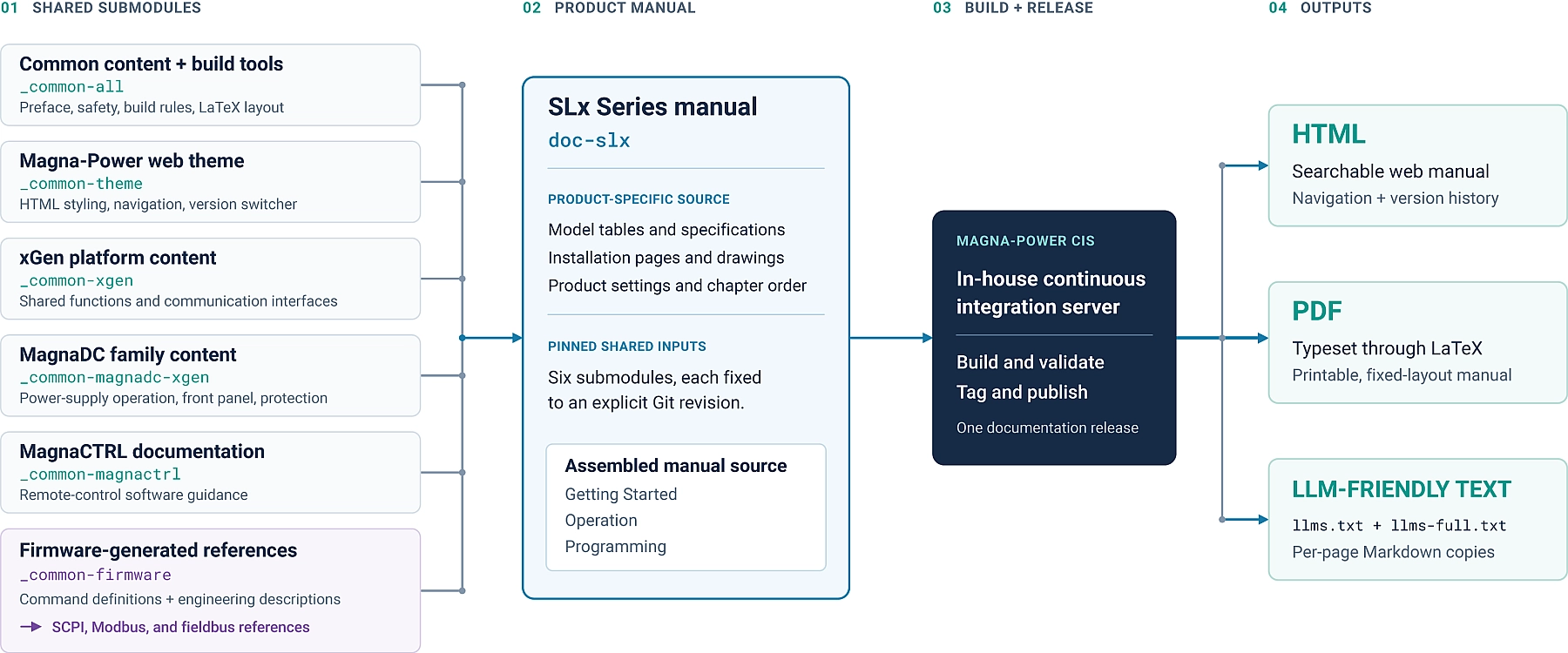
Command Documentation Generated from Firmware
Every SCPI command is defined as structured data in the firmware source: syntax, parameters and their ranges, query form, description, and examples. The firmware build generates the command parser from that table. The documentation build generates the Programming chapter from the same table.
The documentation generator knows what product family it is building for. For example, the power supply has a command to enable its DC output; an electronic load has a command to enable its DC input. One set of definitions yields the correct reference for each product type, listing the commands that product actually implements.
The payoff is turnaround time. When an engineer adds a parameter to a command, they edit one definition. The next firmware build accepts the parameter, and the documentation build describes it, using the engineer's own description and example. This firmware-based documentation becomes part of the code review process, ensuring correctness and meaning no handoff to a third party.
Built and Released with Continuous Integration Workflow
This build process runs on the same in-house continuous integration server that compiles our firmware, MagnaCTRL software, and test and calibration tools. Documentation is a build artifact like any other: tagged with its own version and bundled into the same release snapshot as the firmware it describes. Snapshot 75, released this month, pairs firmware 0.084 with tagged SLx, ALx, BDx, and DBx manuals.
One build produces three outputs from one source. HTML for the web manuals. PDF typeset through LaTeX, for the manual a customer prints and files with a project, and markdown for large language models. One shared LaTeX layout governs typography, numbered figures and tables, and cross-references in every manual, down to scaling dimensional drawings to the page and keeping command names from hyphenating across a line break.
The Web Manuals
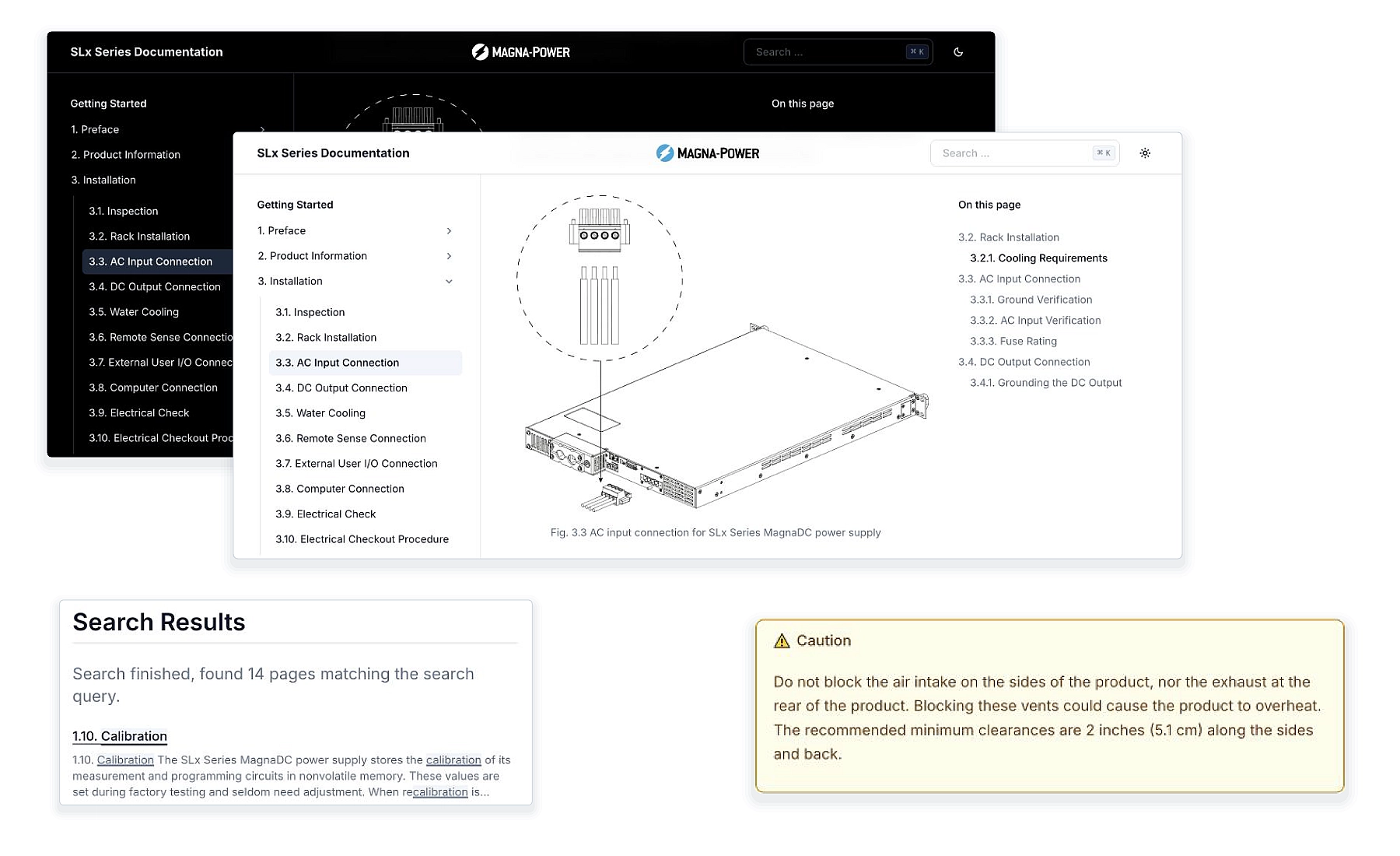
The web manuals also have a new in-house developed theme, built to match magna-power.com. Technical drawings are all vector graphics, designed to scale appropriately in a lightbox upon click, without having to download the PDF. Code examples have syntax highlighting and a copy button. The left navigation tracks your position as you scroll. Dark mode inverts line-art diagrams so black-on-transparent drawings stay readable, while logos and photographs are left alone. Warning and Caution callouts carry the ISO 7010 safety-alert symbol in its standard colors in both modes. Fonts are self-hosted, allowing a consistent look when a manual is saved for offline use.
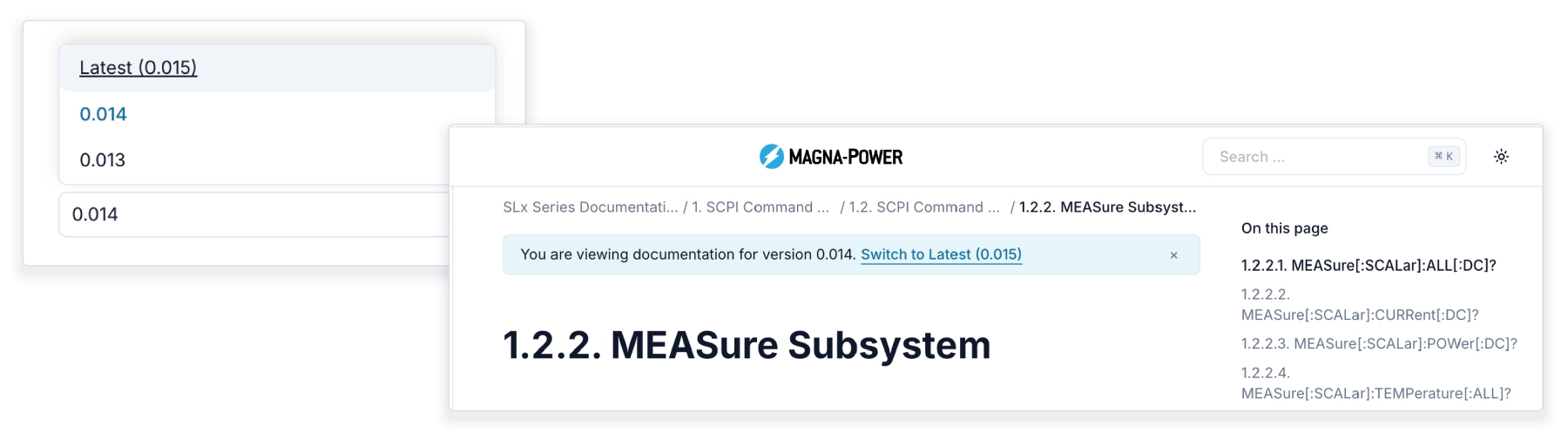
Documentation Version Switcher
Until now, only the latest version of the product's manual was online, and older builds were overwritten. If you commissioned a system against an earlier firmware and wanted the manual as it was then, there was no way to (easily) get it.
Each manual now has a Documentation Version switcher. The latest release remains at the product's usual address, and every earlier release is archived. On every build, the continuous integration server writes a version manifest at the product's documentation root, and the switcher reads that manifest when a page loads. An archived page therefore lists every version published since its release, including newer ones. Choosing a version takes you to the same page in that version when it exists, and to that version's front page when it does not. Archived pages carry a banner saying which version you are reading, with a link to the latest.
Documentation versions are numbered separately from firmware and they get paired through the release snapshot. The archive begins with this release, so earlier builds may not be available.
Manuals You Can Hand to an AI Assistant
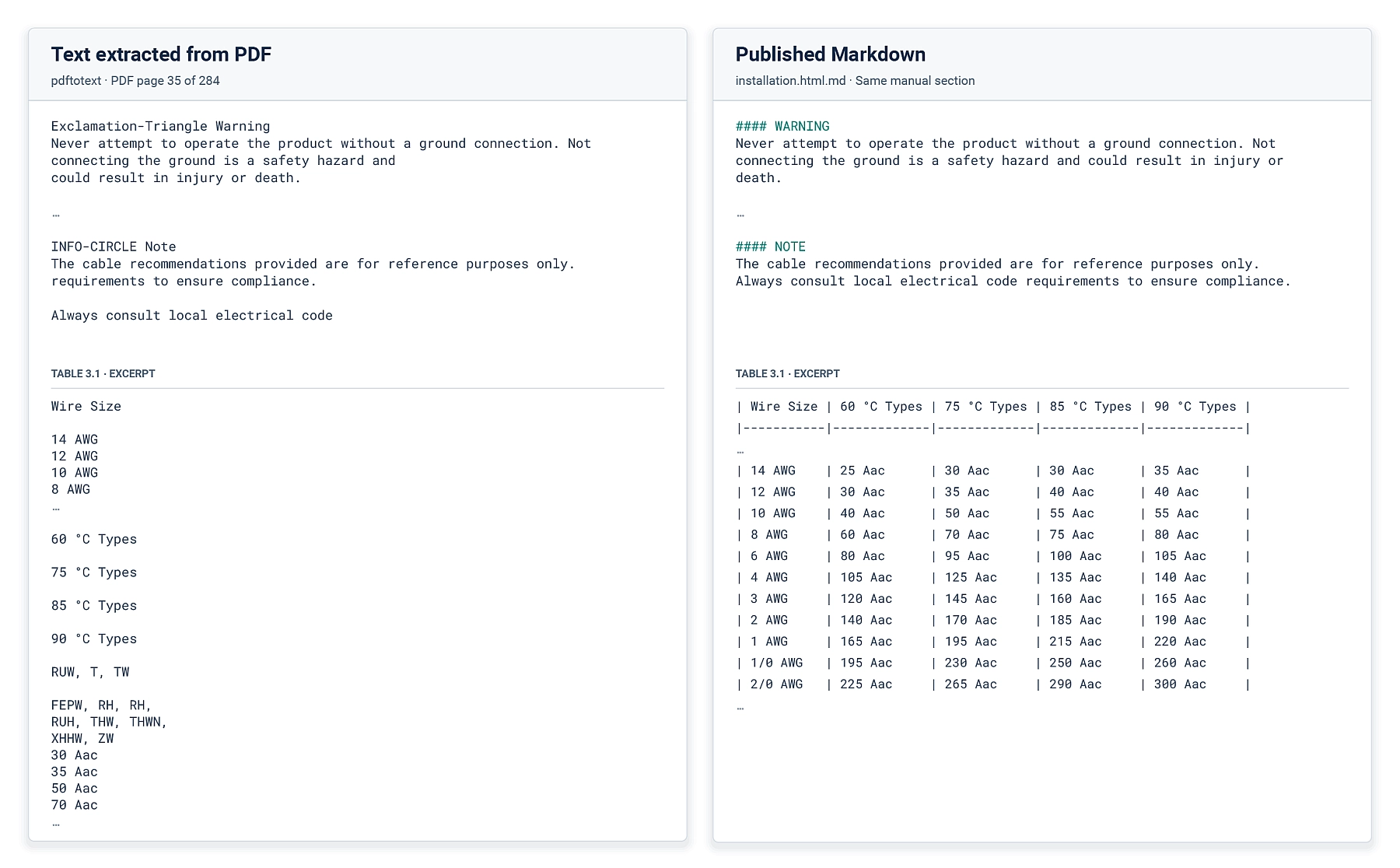
Engineers increasingly hand an AI assistant a manual and ask it to draft a test script or decode a status register. PDF text extraction can disrupt reading order and table structure, as the example below shows, which uses a common Python library pdftotext to convert a page from a PDF.
Every manual now also publishes as plain text following the llms.txt convention: an index at the manual's root, a Markdown rendering of every page next to its HTML, and one concatenated file containing the whole manual. Markdown formatting ensures headings, tables, and code blocks are kept intact. Hazard callouts now come through as labeled blocks, and an assistant summarizing an installation procedure sees the same warnings a person would. The text files come out of the same build as the HTML, ensuring they always stay in sync. If that step fails, the whole build fails rather than deploying a manual without them.
Treating documentation as part of the product lets us carry each improvement into every manual that needs it and release it alongside the features it explains. Customers get consistent guidance for their equipment, in the version and format that best supports their work.
Reference documentation examples for the SLx Series, built from the same source: